F-15C HUD Operation
The Head-Up Display (HUD) is the primary flight and weapons reference in the F-15C. It combines attitude, navigation, air data, target, and weapon information so the pilot can keep looking outside during maneuvering and engagements.
Jump to a section:
Basic HUD Symbology
Many HUD symbols remain visible regardless of the selected master mode.
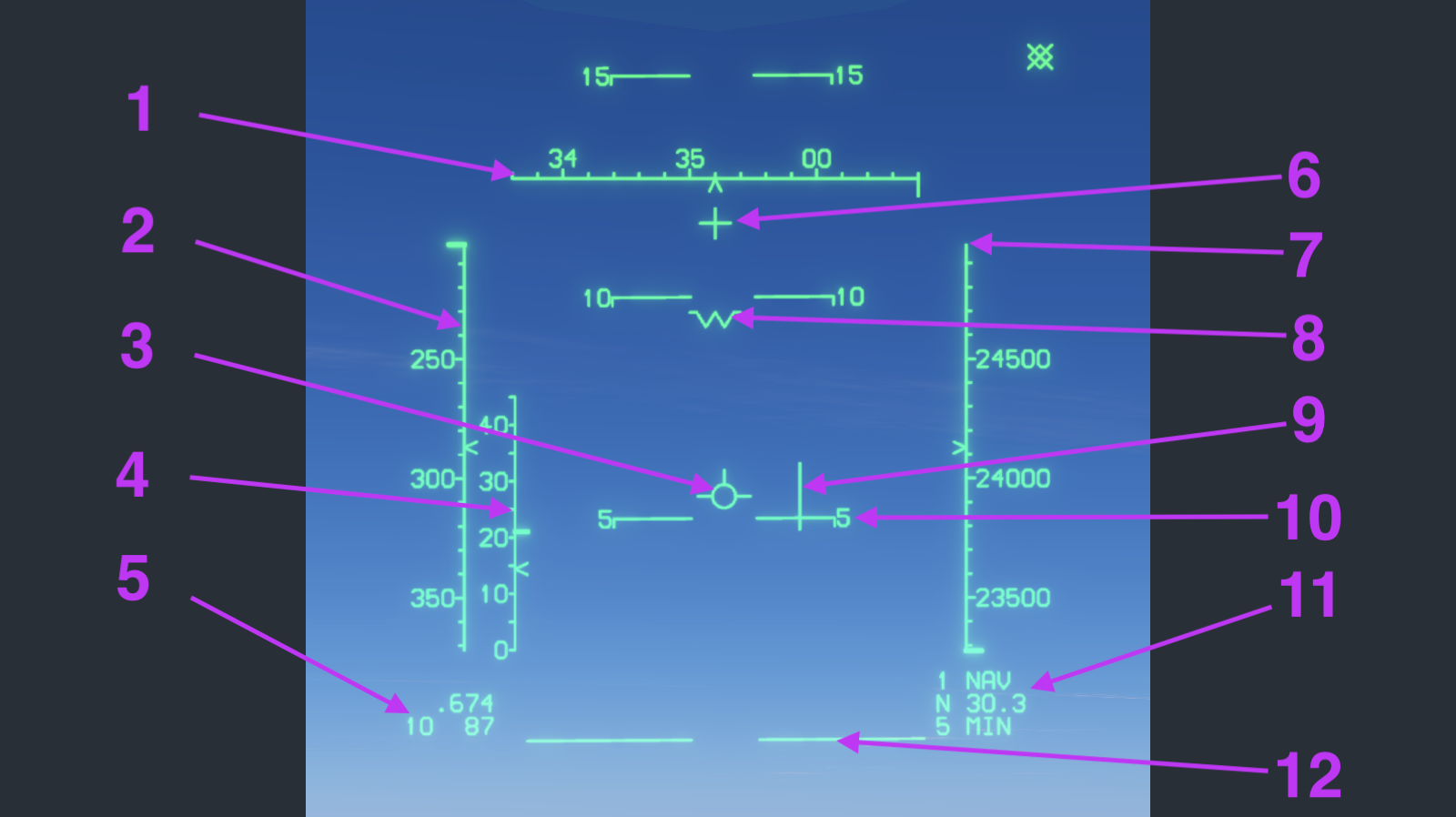
The small angled pointers on the heading, airspeed, altitude, and angle-of-attack scales are called carets. Each caret points to the current value on its scale.
Symbology Index
Select a numbered item to jump to its detailed explanation.
Detailed Explanation
1. Heading Scale
The horizontal tape shows magnetic heading. Two-digit labels represent tens of degrees, so 35 means 350° and 00 means 000°. The caret points to the aircraft's current heading on the scale.
The vertical line extending below the tape indicates the bearing to the selected navigation point. In this example, the marker is to the right of the current heading, so a right turn is needed to fly toward the navigation point.
2. Airspeed Scale
The left vertical tape shows indicated airspeed in knots. The caret points to the current indicated airspeed on the scale.
3. Velocity Vector
The circular flight-path marker shows where the aircraft is actually moving. Its position relative to the aircraft symbol reveals the difference between nose attitude and flight path, including drift caused by wind or sideslip.
4. Angle-of-Attack Scale
The inner scale beside the airspeed tape shows angle of attack in AoA units. The caret points to the current AoA on the scale. AoA rises as the nose-to-flight-path angle increases.
The thickest tick mark on the scale represents on-speed AoA. During landing, align the current AoA caret with this mark to maintain the correct landing angle of attack.
5. Mach and G Readouts
The upper value is current Mach. The lower pair shows current G and maximum allowable G; in this compact display format, 10 represents 1.0 G and 87 represents 8.7 G.
The F-15C's maximum allowable load factor is 9 G, but the system recalculates the allowable limit based on the current Mach number and external stores configuration. The HUD therefore shows the limit for the current conditions, which is not always 9 G.
6. Gun Cross
The fixed cross is aligned with the M61 cannon boresight and appears when master arm is on. Computed gun modes add their own aiming solution in addition to this reference.
7. Altitude Scale
The right vertical tape shows barometric altitude in feet during normal navigation. The caret points to the current altitude on the scale.
8. Aircraft Symbol
The W-shaped symbol is a fixed aircraft waterline reference. Comparing it with the velocity vector makes the aircraft's angle of attack and flight-path displacement easy to see.
9. Bank Steering Cue
This cue provides steering toward the selected navigation point. Bank to bring the velocity vector toward the cue, then reduce bank as the cue and flight path come together.
10. Pitch Scale
The pitch ladder shows aircraft pitch attitude in 5-degree increments and rotates with bank angle. Positive pitch lines appear above the horizon and negative pitch lines below it.
11. Navigation Data
The lower-right block identifies the selected route point and navigation mode, followed by source/distance and estimated time to go. In the example, 1 NAV, N 30.3, and 5 MIN indicate route point 1, 30.3 NM remaining, and approximately five minutes to arrival.
12. Horizon Line
The horizon line is the 0° pitch reference. It remains an attitude reference when the outside horizon is difficult to see and moves relative to the aircraft symbol as pitch changes.
Back to symbology index · Back to top
Gun Modes
The gun HUD presentation depends on whether radar ranging is available. The following three figures show the no-lock aiming reference, the GDS reticle with an STT lock, and the BATR cue after firing.
Gun Without Radar Lock
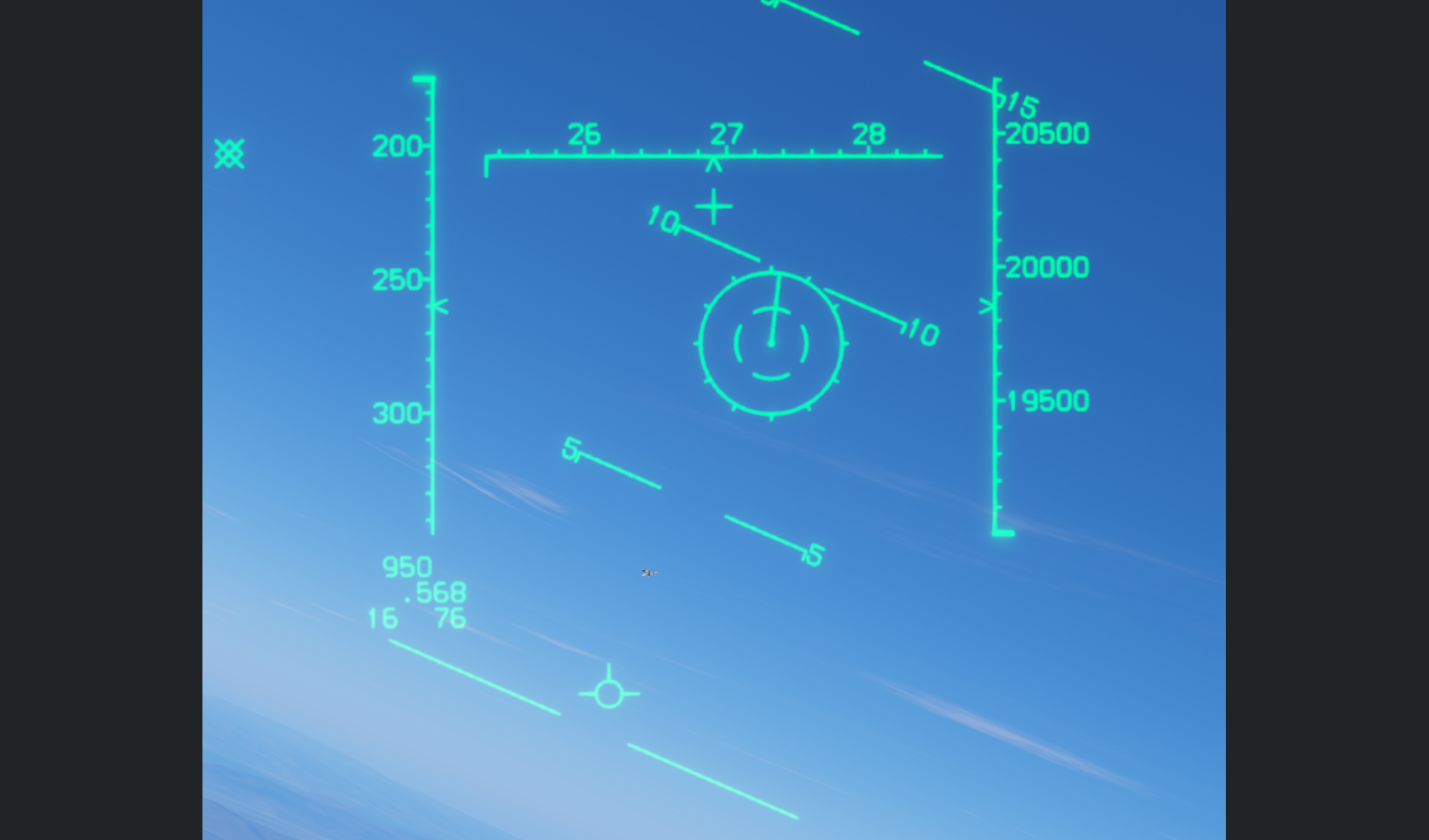
Without radar lock, the gun aiming point is calculated for a fixed assumed range of 2,000 feet. It represents the predicted bullet position at that range, not a solution based on the target's actual radar-measured distance.
Unlike the F-16 or F/A-18, the F-15C does not display a gun funnel when radar ranging is unavailable. It uses this fixed-range aiming reference instead.
Back to gun index · Back to top
Gun Director Sight
With the gun selected, the Gun Director Sight (GDS) reticle appears only when the radar is in Single Target Track (STT) and the target is within gun range.
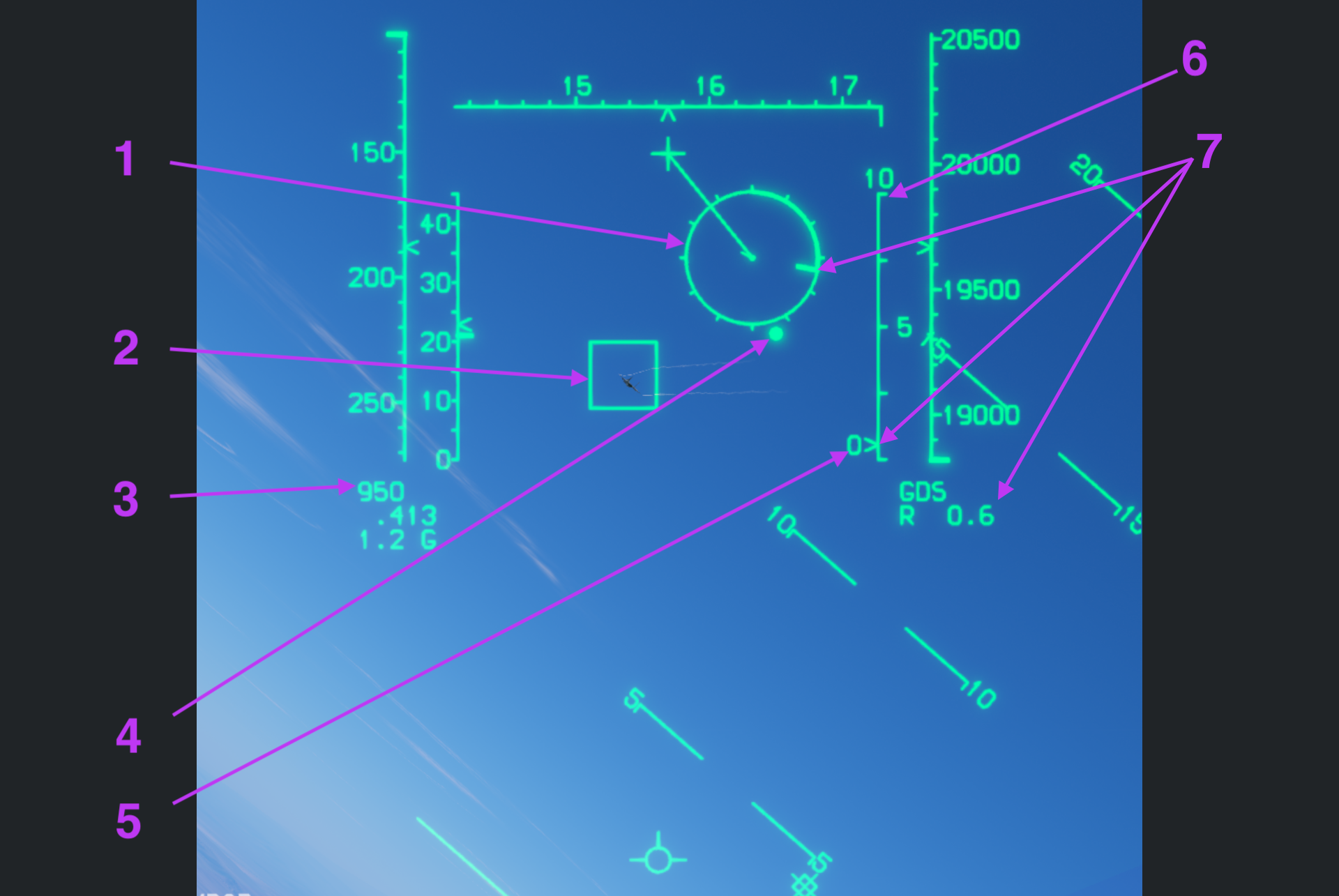
1. GDS Reticle
Each tick around the reticle represents 1,000 feet. The small center dot is the computed gun aiming pipper.
To fire, hold the center pipper steadily on the target, or sweep it across the target in the direction of the target's lift vector while firing. GDS provides a predicted aiming solution; a hit also depends on how the target moves during the bullets' time of flight.
2. Target Designator Box
The Target Designator (TD) box marks the radar-locked target's Line of Sight (LOS). It shows the target's current direction, not the lead-compensated gun aiming point.
3. Gun Ammunition
This readout shows the number of gun rounds remaining. In the figure, 950 means 950 rounds remain.
4. Range Cue
The bright dot near the reticle's circumference is a range cue that helps assess gun range. It changes with current conditions rather than representing a fixed distance reference.
5. Closure Rate
Closure rate shows how quickly the distance between your aircraft and the target is changing, in knots. Positive values mean the distance is decreasing; negative values mean it is increasing. The figure shows 0.
6. Radar Range Scale
The radar range scale on the right side of the HUD indicates target range. The 10 at the top means the current full-scale range is 10 nautical miles; the middle 5 marks 5 nautical miles.
7. Target Slant Range
All three locations marked by number 7 show target slant range: the straight-line distance from your aircraft to the target.
- Range mark on the reticle circumference: read at 1,000 feet per tick; the illustrated position is visually estimated at about 3,300 feet.
- Pointer on the radar range scale: indicates target range against a scale in nautical miles.
- Lower-right numeric readout:
R 0.6indicates a target slant range of 0.6 nautical miles.
Distinguish the reticle's feet scale from the nautical miles used by the radar scale and numeric readout.
Back to GDS index · Back to gun index · Back to top
Bullets at Target Range (BATR)
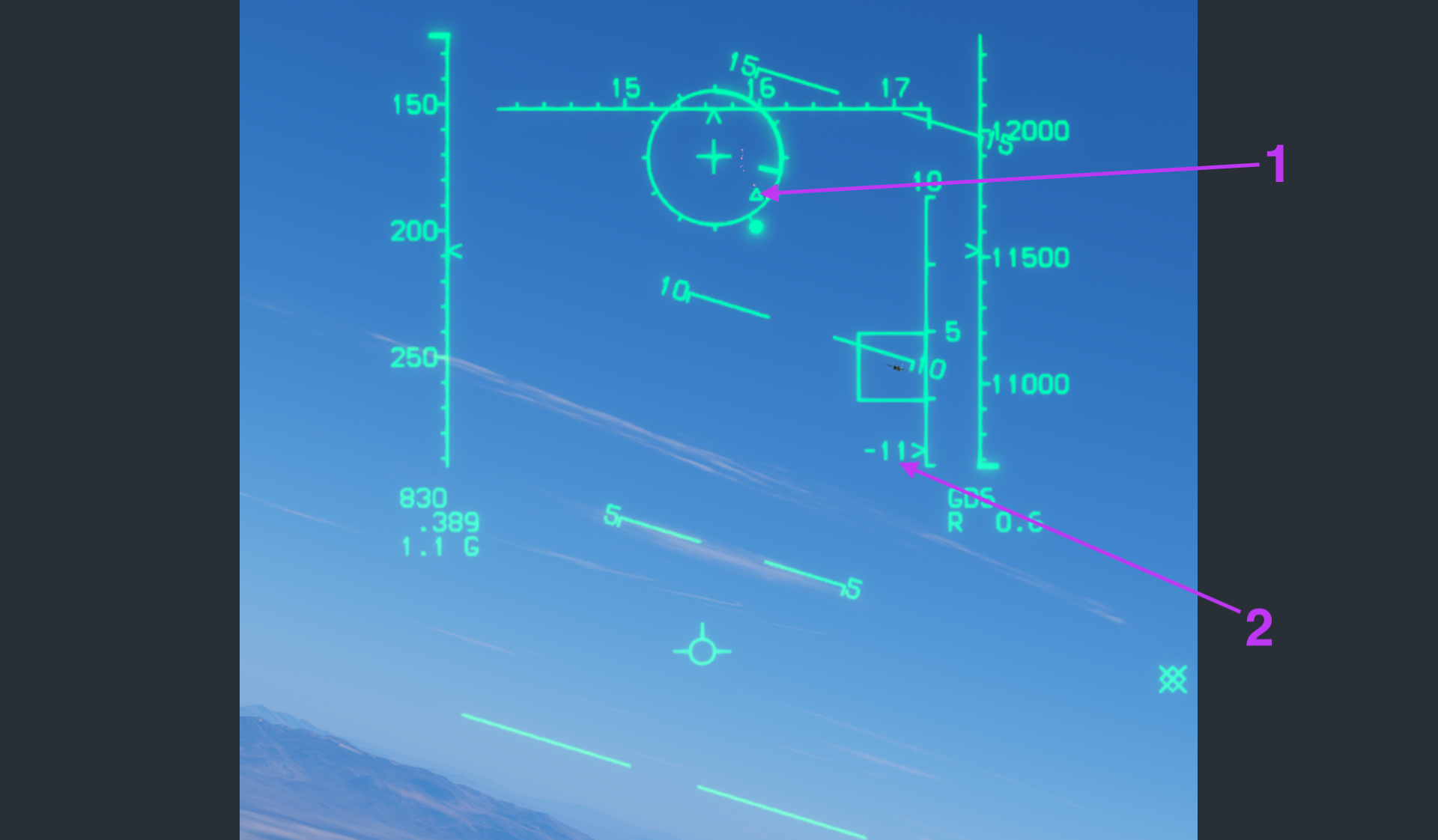
1. BATR Triangle
BATR stands for Bullets at Target Range. After the gun fires, the HUD displays a triangle at the bullets' position when they reach the target's current range.
The GDS pipper is a prediction made when firing. Even with the pipper on the target, a hit is possible only if the target's acceleration does not change substantially during the bullets' time of flight. BATR provides post-shot assessment instead, showing whether the fired bullets overlap the target when they reach its range.
If the BATR triangle remains superimposed on the target, this indicates that the bullet stream is hitting it. If the cue is separated from the target, the bullets are passing beside it at target range.
2. Negative Closure Rate
The -11 in the figure is closure rate in knots. The minus sign means the target is opening: the distance between the two aircraft is increasing at approximately 11 knots.
Back to BATR index · Back to gun index · Back to top
AIM-9 Sidewinder Modes
The following sequence describes this game's HUD: seeker modes, radar-assisted launch cues, and the changes as a target closes from beyond maximum range to below minimum range.
Assess range conditions separately from seeker lock. An expanded ASE circle or IN RNG does not confirm a seeker lock; also confirm that the seeker points at the target and produces the high-pitched lock tone.
Figure 1 · SM and Caged Mode
Selecting short-range missiles (SM) displays the AIM-9 weapon status and seeker symbols on the HUD. The seeker defaults to caged mode, pointing near the aircraft boresight.
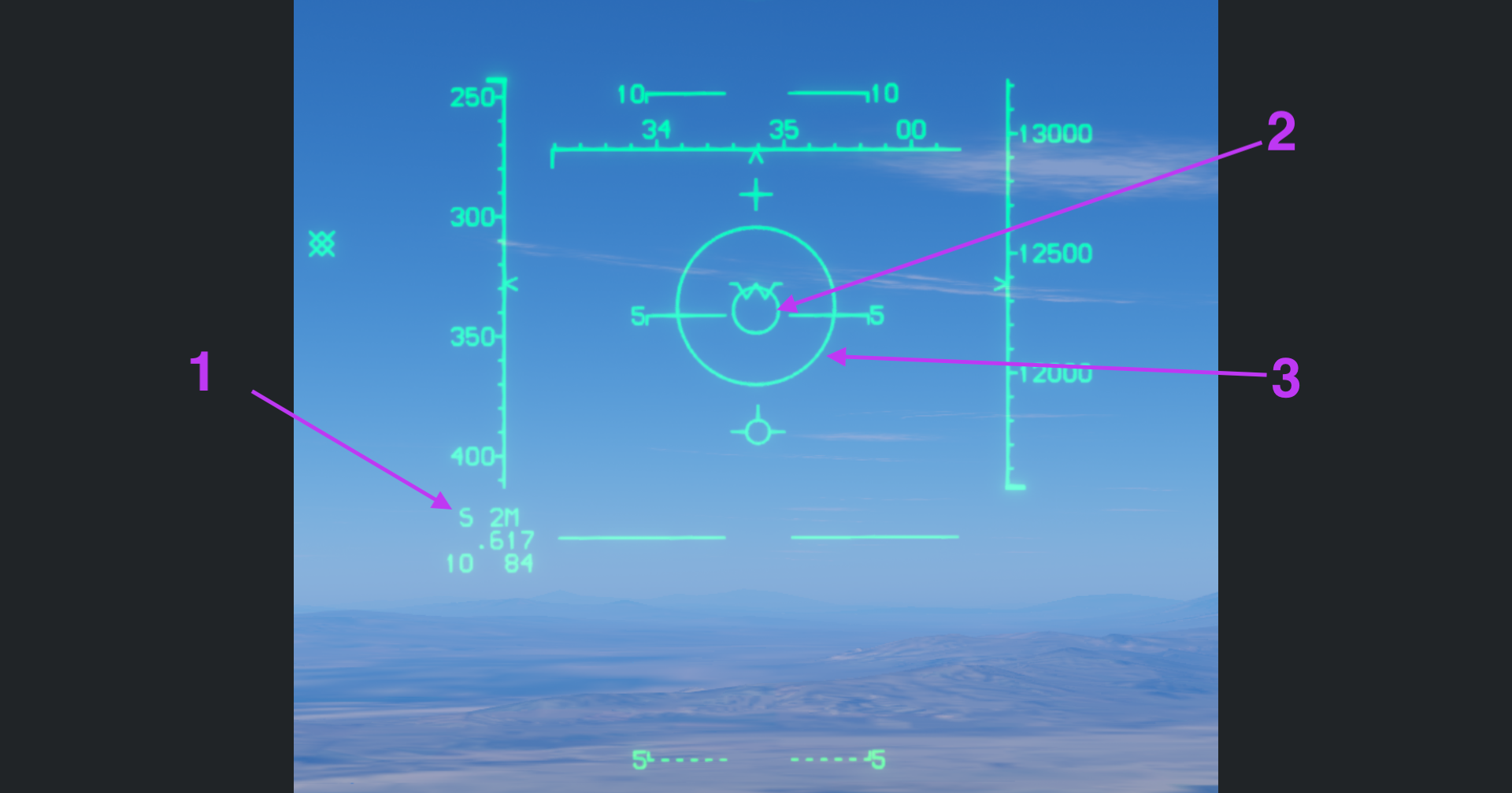
1. Weapon Status: S 2M
The lower-left S 2M readout identifies the selected weapon and remaining quantity:
S: SM, short-range missiles.2: two missiles remaining.M: the selected variant is AIM-9M.
2. Seeker Direction
The small circle shows the missile seeker's current direction. Here it remains caged near the aircraft boresight rather than following the target.
3. Seeker Search Area (Not Yet Implemented)
The larger outer circle represents the seeker search area. The corresponding search function is not yet implemented; this circle must not be interpreted as confirmation that a search or target lock has been completed.
Back to figure 1 index · Back to AIM-9 index · Back to top
Figure 2 · Uncaged Mode
Uncaging releases the seeker from its caged position. In this figure, the small circle has moved away from the boresight area and is tracking the target.
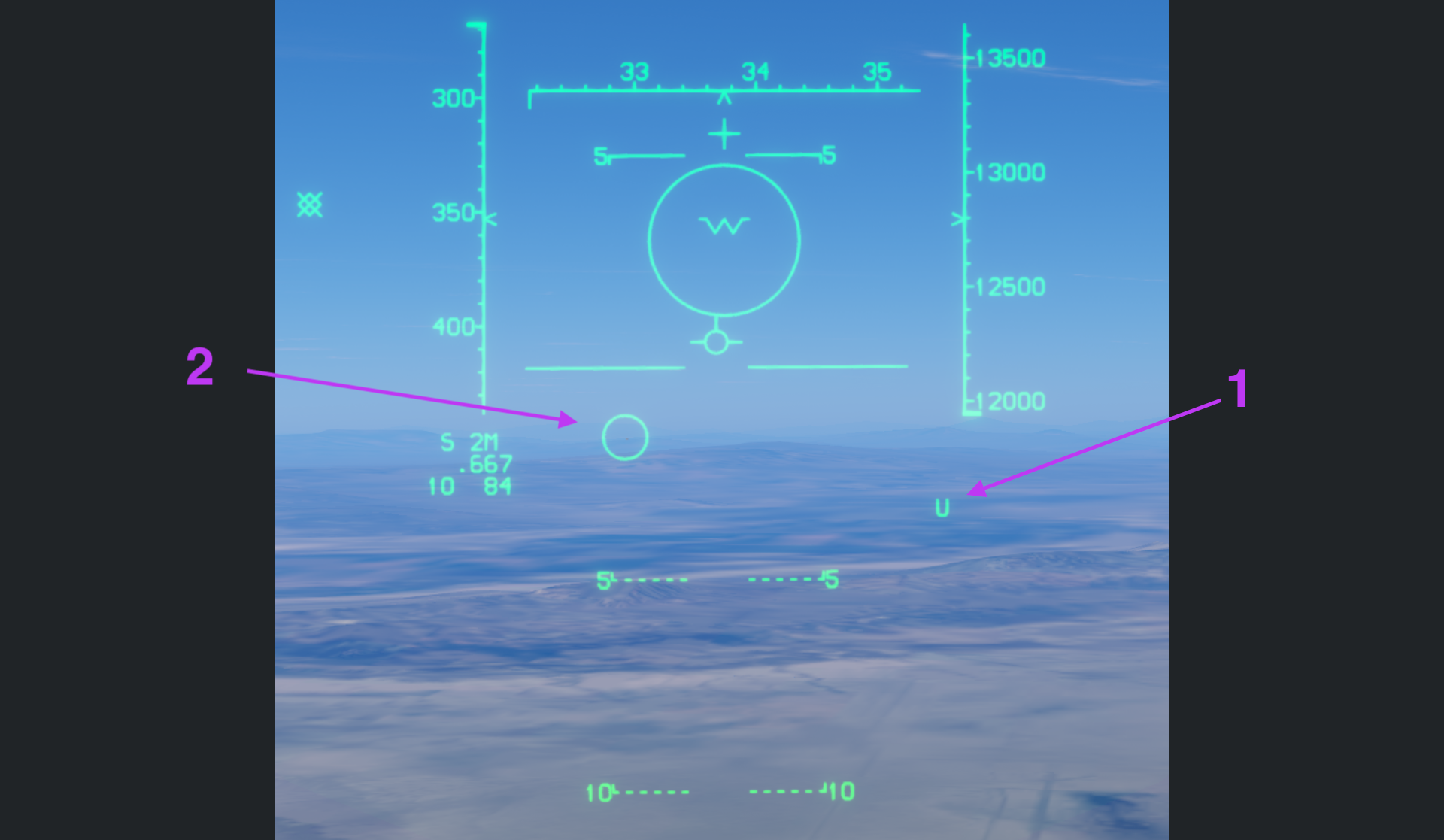
1. U: Uncaged Status
The U at the lower right indicates that the seeker is uncaged. It identifies the seeker mode, not a confirmed target lock by itself.
2. Tracking Seeker Direction
The small circle shows the line of sight of the seeker tracking the target. Before launch, confirm that it points at the intended target and that the high-pitched lock tone is audible in the headset.
Back to figure 2 index · Back to AIM-9 index · Back to top
Figure 3 · PDT and Dynamic Launch Zone
Once the radar has a Primary Designated Target (PDT), its target data allows the system to calculate the missile's Dynamic Launch Zone (DLZ) and display the ASE circle, steering dot, target box, and range cues. The target in this figure is still beyond maximum range.
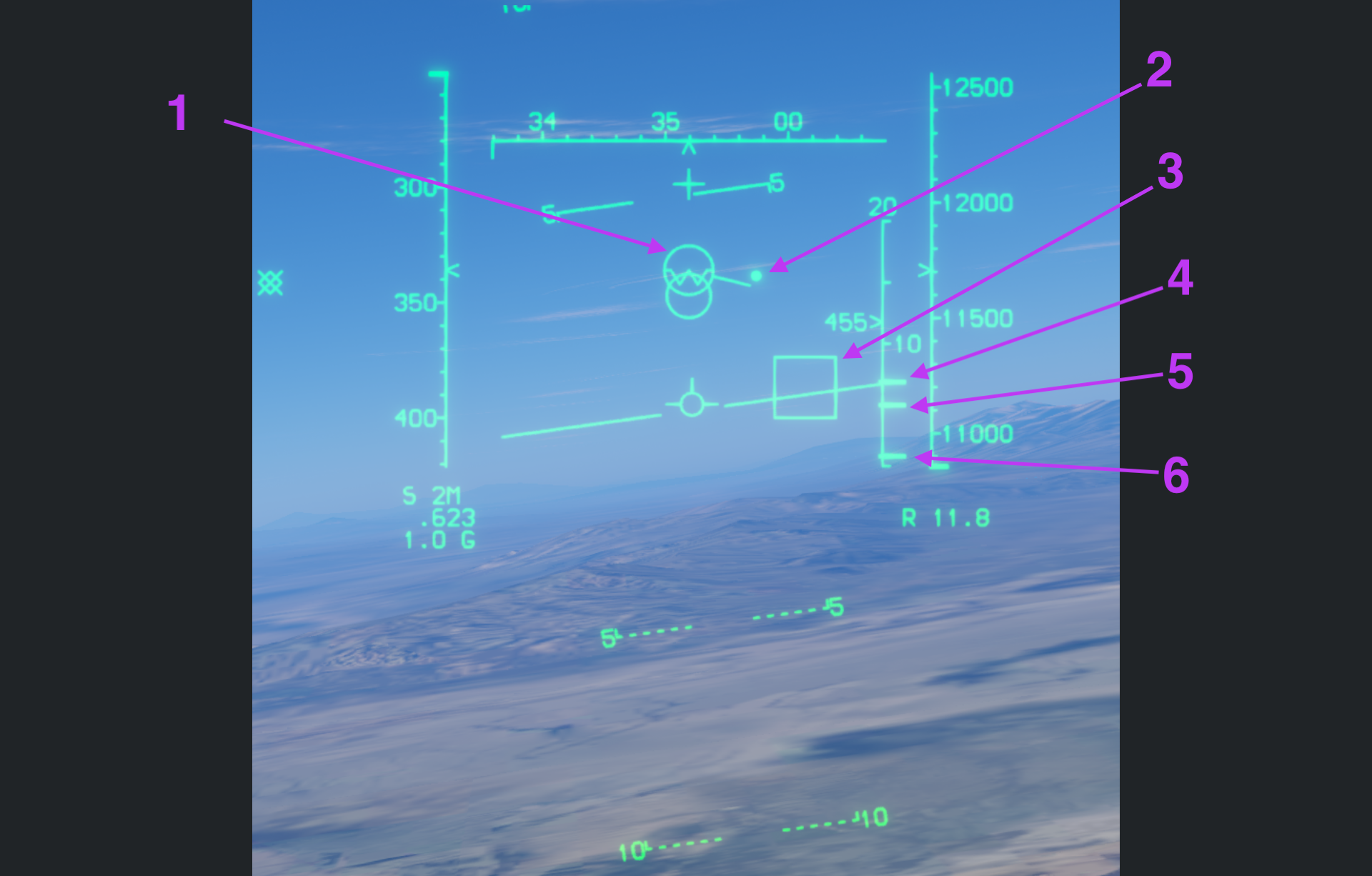
1. ASE and Target Velocity Vector
The Allowable Steering Error (ASE) circle is reduced in size while the target is beyond maximum range.
The line extending from the circle represents the target's velocity vector in a top-down view. It is not a trace of the target's vertical movement across the HUD.
2. Steering Dot
The bright dot is the steering dot. Maneuvering to place the dot inside the ASE circle helps reduce the turning required for the missile to track the target after launch, conserving missile energy and improving the engagement geometry.
The dot is a launch steering reference, not a seeker-lock symbol. The target here remains beyond maximum range, so placing the dot inside ASE alone is not a reason to launch.
3. Target Designator Box
The TD Box marks the radar PDT's Line of Sight (LOS). It locates the radar-designated target but does not confirm that the AIM-9 infrared seeker has locked onto it.
4. RMax: Maximum Range
The upper DLZ cue marks the calculated maximum range under current conditions. A target beyond RMax is outside the computed launch envelope.
5. RTR: Range Turn and Run
RTR estimates missile range against a target that turns and runs away, commonly described as no-escape range. A target inside RTR presents more favorable launch conditions, but this is not a guarantee of a hit.
6. RMin: Minimum Range
The lower DLZ cue marks minimum range. Do not launch when target range is below RMin; see Figure 7 for the corresponding HUD warning.
Back to figure 3 index · Back to AIM-9 index · Back to top
Figure 4 · In Range, but Still Caged
When the target enters maximum range, the ASE circle expands and the HUD displays IN RNG. The range conditions now allow a potential hit, but this does not confirm an infrared seeker lock.
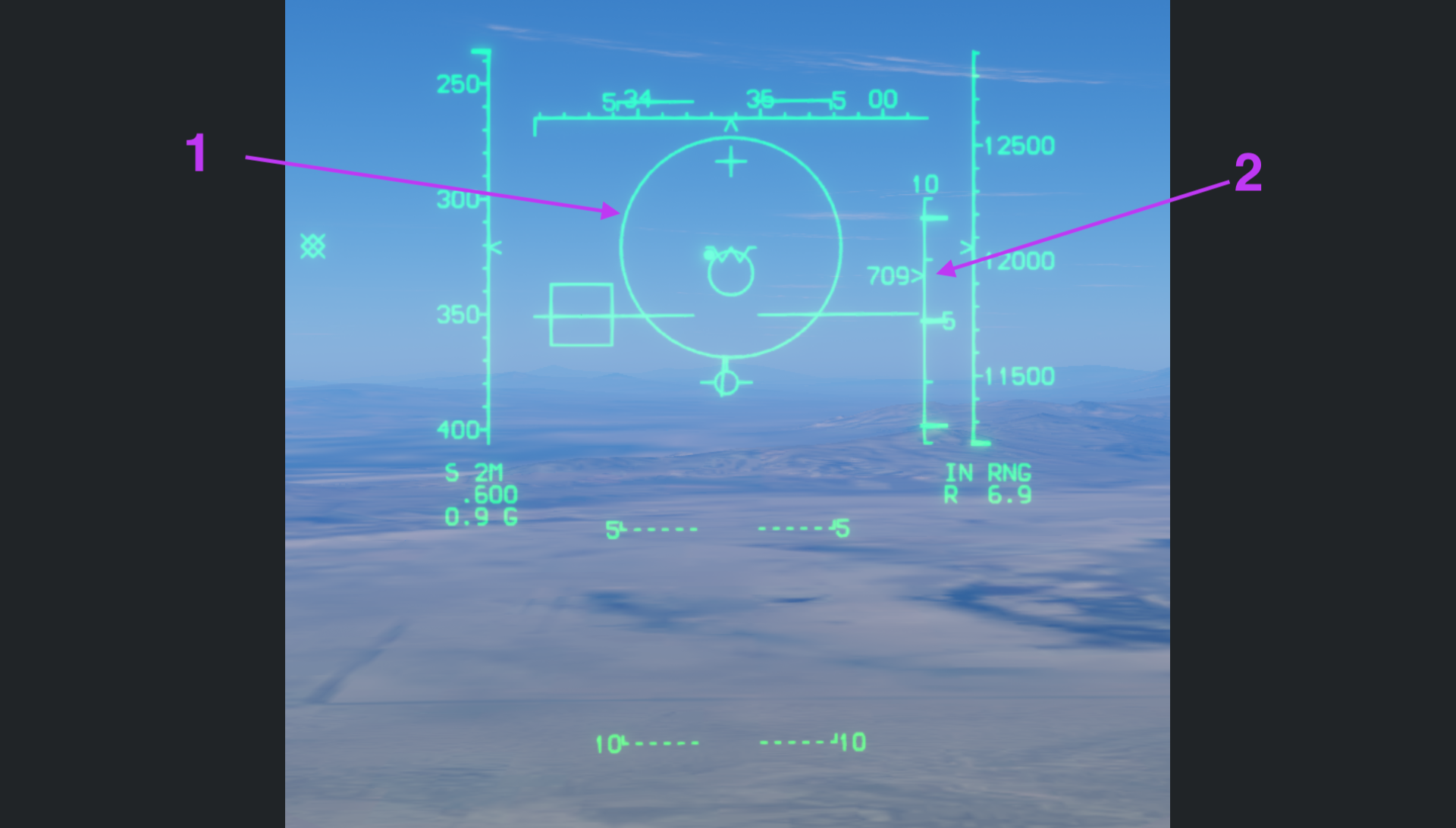
1. Expanded ASE Circle
The ASE circle is expanded, but the small seeker circle remains near the boresight rather than pointing at the target in the TD Box to the left. Do not launch in this state.
The seeker must point at the target and produce the high-pitched lock tone. Assess these together with range before launching; an expanded ASE circle or IN RNG alone is insufficient.
2. Closure Rate and Range Pointer
Number 2 points to the radar range pointer and the adjacent closure-rate readout. 709 is in knots; the positive value means the distance between the aircraft is decreasing. It is not a seeker-lock cue.
Back to figure 4 index · Back to AIM-9 index · Back to top
Figure 5 · Uncaging and Slaving to the PDT
With a radar PDT available, uncaging slaves the seeker to that target's Line of Sight (LOS).
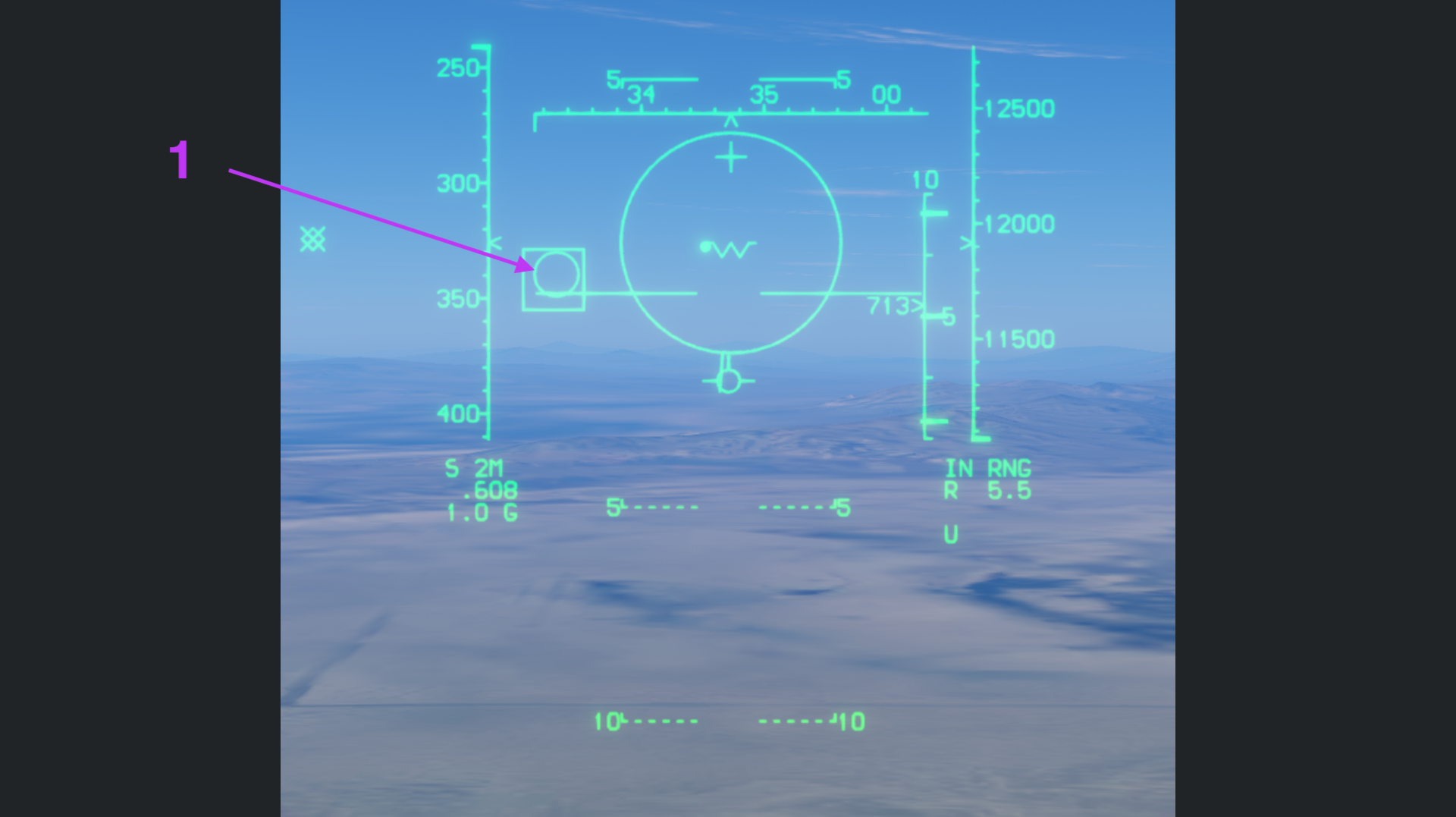
1. Seeker Slaved to Target LOS
The small seeker circle overlaps the target box, and U appears at the lower right. The radar supplies the target direction to point the seeker toward it.
Slaving to the target direction is not the same as acquiring an infrared lock. Confirm the high-pitched seeker lock tone and acceptable range conditions before launch.
Back to figure 5 index · Back to AIM-9 index · Back to top
Figure 6 · Inside RTR and the Close-Range Ring
When the target enters RTR, a triangle appears beneath the TD Box and the ASE circle flashes. These cues indicate very favorable launch conditions; seeker lock and the RMin restriction still apply.
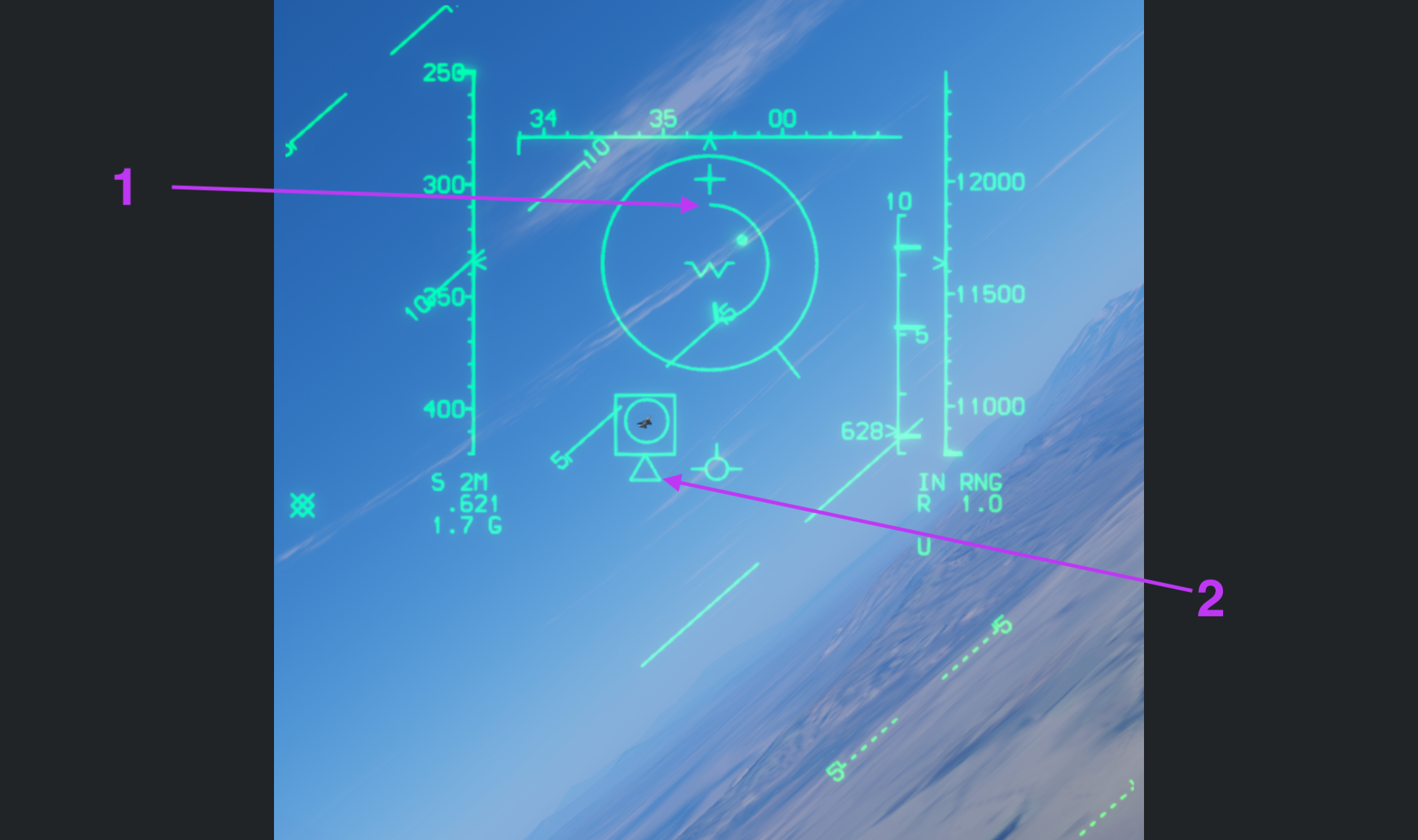
1. Close-Range Ring
An additional circular range indication appears when target range falls below 12,000 feet. It provides a close-range slant-range reference and has a different purpose from the outer ASE circle.
The inner range arc in this figure is approximately a half-circle, indicating that the target has just entered about 6,000 feet. The lower-right numeric readout also shows R 1.0.
2. Triangle Beneath the TD Box
The triangle below the target box indicates that the target is inside RTR. Together with the flashing ASE circle, it signals favorable launch conditions. A still image cannot show the ASE flashing.
Back to figure 6 index · Back to AIM-9 index · Back to top
Figure 7 · Below Minimum Range: Break X
When the target is closer than minimum range, the ASE circle disappears and a flashing Break X replaces it.
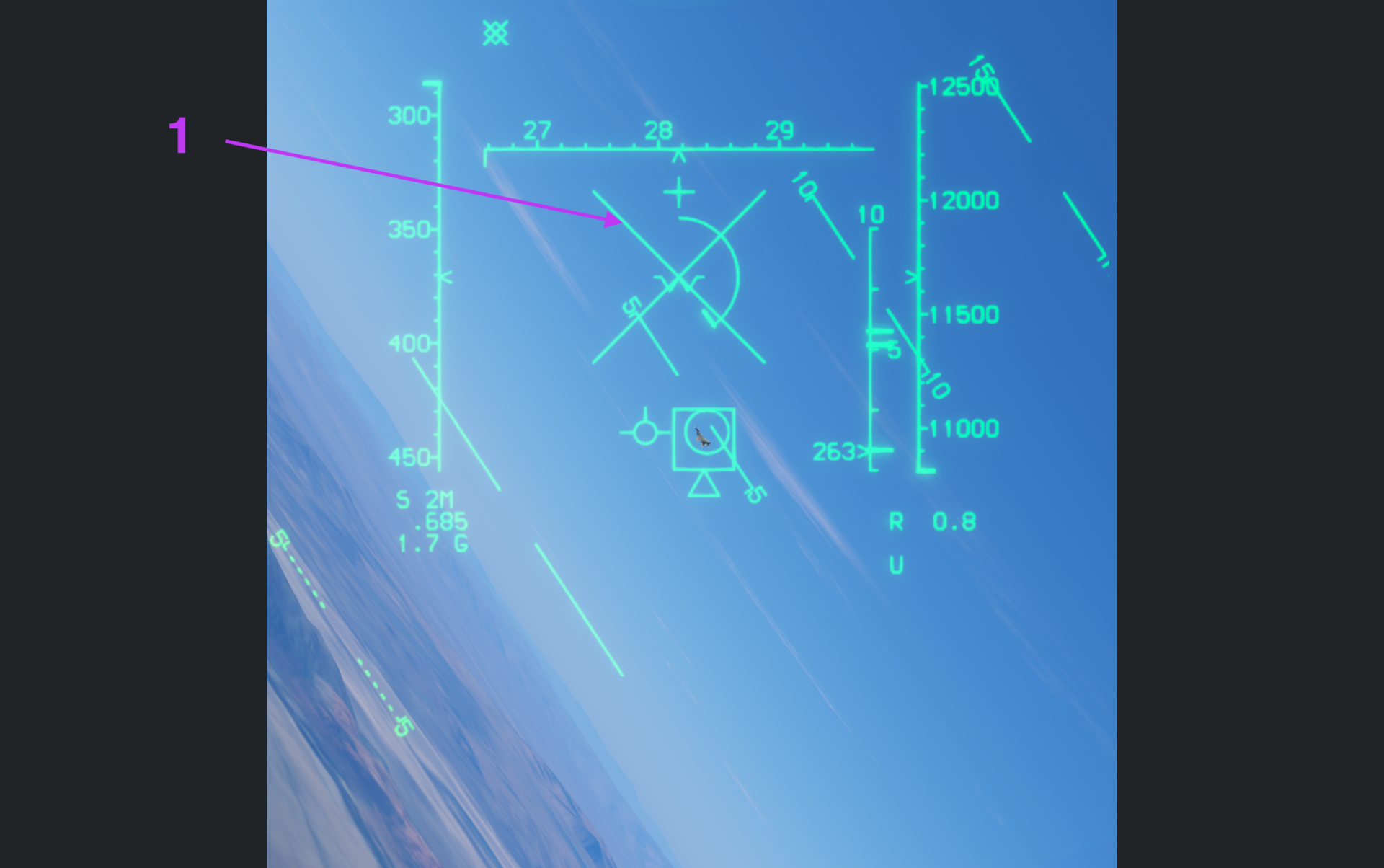
1. Break X: Target Too Close
The large X is the Break X cue. Do not launch: at this short distance, the missile may not have time to accelerate to an effective speed, and explosion fragments may intersect your aircraft's flight path.
Do not disregard the minimum-range warning even if the seeker remains on the target or the triangle is still visible beneath the TD Box. Increase separation before reassessing launch conditions.
Back to figure 7 index · Back to AIM-9 index · Back to top
Gun Composite Mode
With SM (short-range missiles) selected, command Coolie Up to enter gun composite mode. The gun becomes available for selection and use while retaining the SM missile selection, and the HUD combines missile and gun symbology.
Figure 1 · Normal HUD
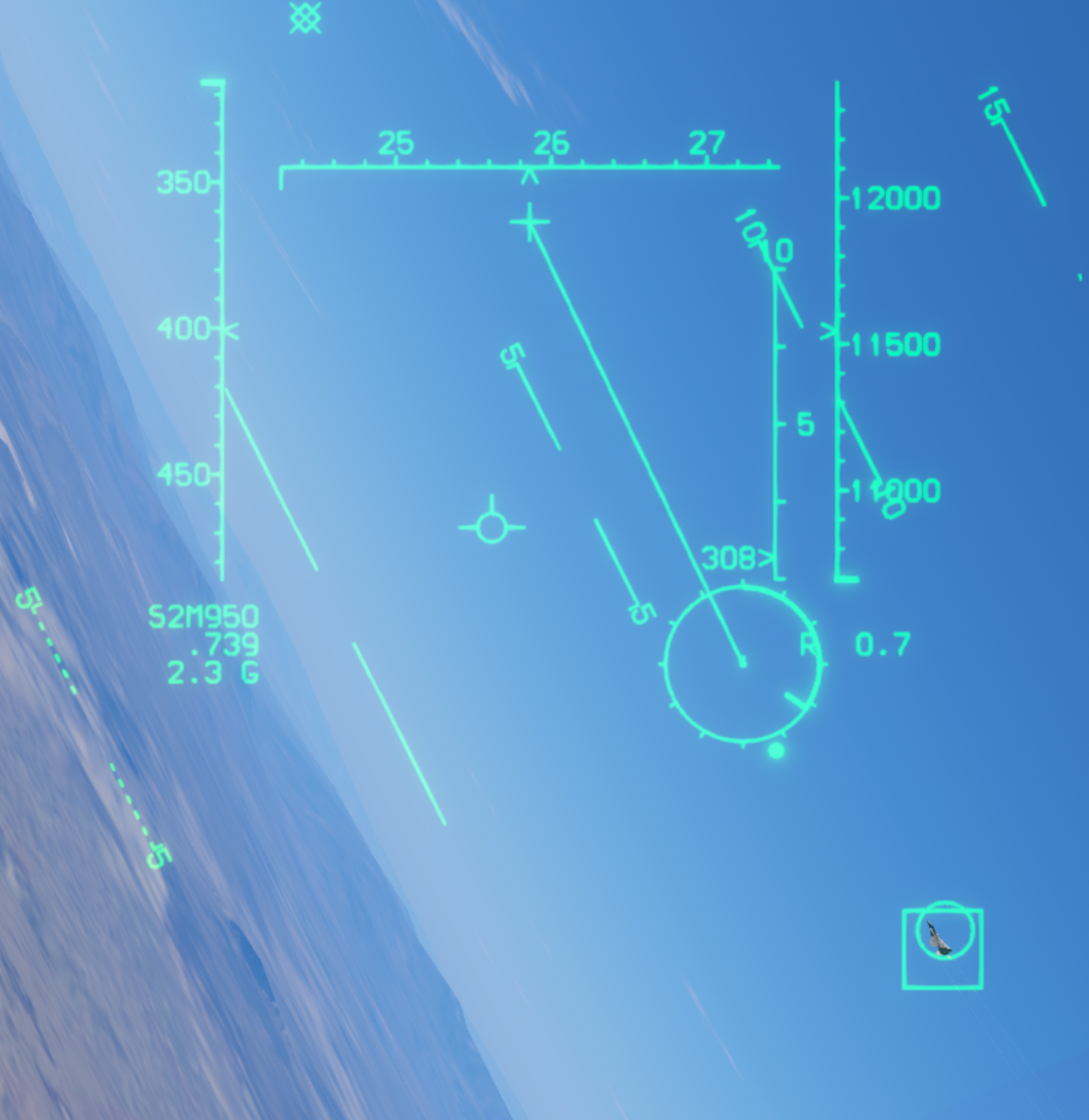
The figure combines the gun GDS reticle, target box, and missile seeker direction. The lower-left S2M950 readout combines SM weapon status and gun ammunition: S2M indicates two AIM-9M missiles, and 950 indicates 950 gun rounds remaining.
See the GDS explanation for the gun reticle and its use, and SM seeker direction for the small seeker circle.
Back to gun composite index · Back to AIM-9 index · Back to top
Figure 2 · HUD REJ
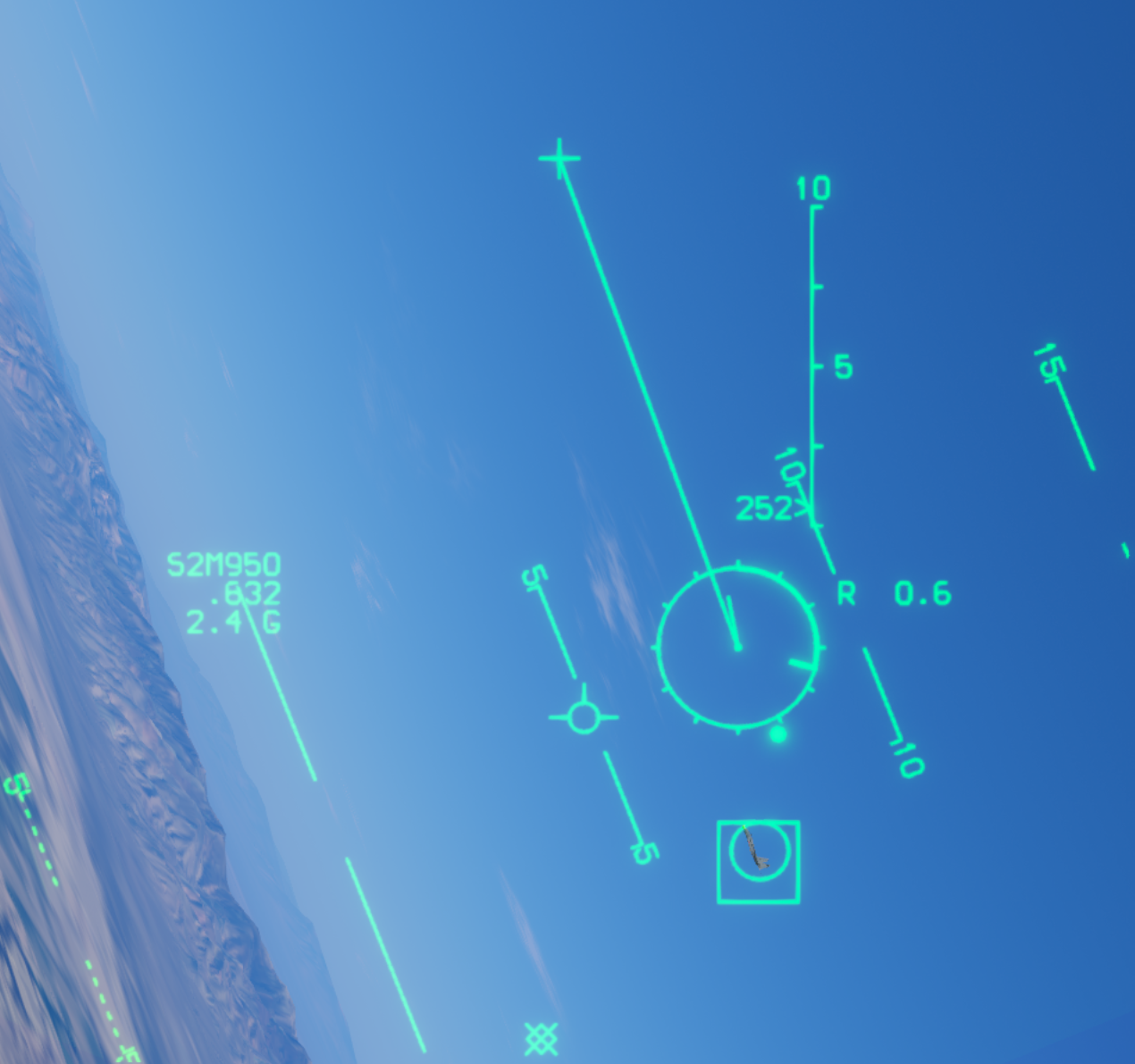
Figure 2 shows the same gun composite mode with HUD REJ selected. The heading, airspeed, and altitude tapes are hidden to reduce clutter. The gun reticle, seeker direction, target box, and radar range scale remain visible.
This changes the HUD's level of detail without leaving gun composite mode. The 0–10 scale still visible on the right is the radar range scale, not the altitude tape.
Back to gun composite index · Back to AIM-9 index · Back to top
AIM-7 Sparrow Modes
Most AIM-7 HUD symbols are shared with the AIM-9M presentation, including the ASE circle, steering dot, Target Designator (TD) box, Dynamic Launch Zone (DLZ), and target range readouts. This section focuses on the differences.
In this game, the AIM-7 must be launched with the radar in Single Target Track (STT). It uses semi-active radar homing and requires continued illumination from your radar after launch until impact. Do not apply the AIM-9's seeker cage/uncage and infrared lock-tone checks to the Sparrow.
Figure 1 · AIM-7 Selection and the 12° Illumination Circle
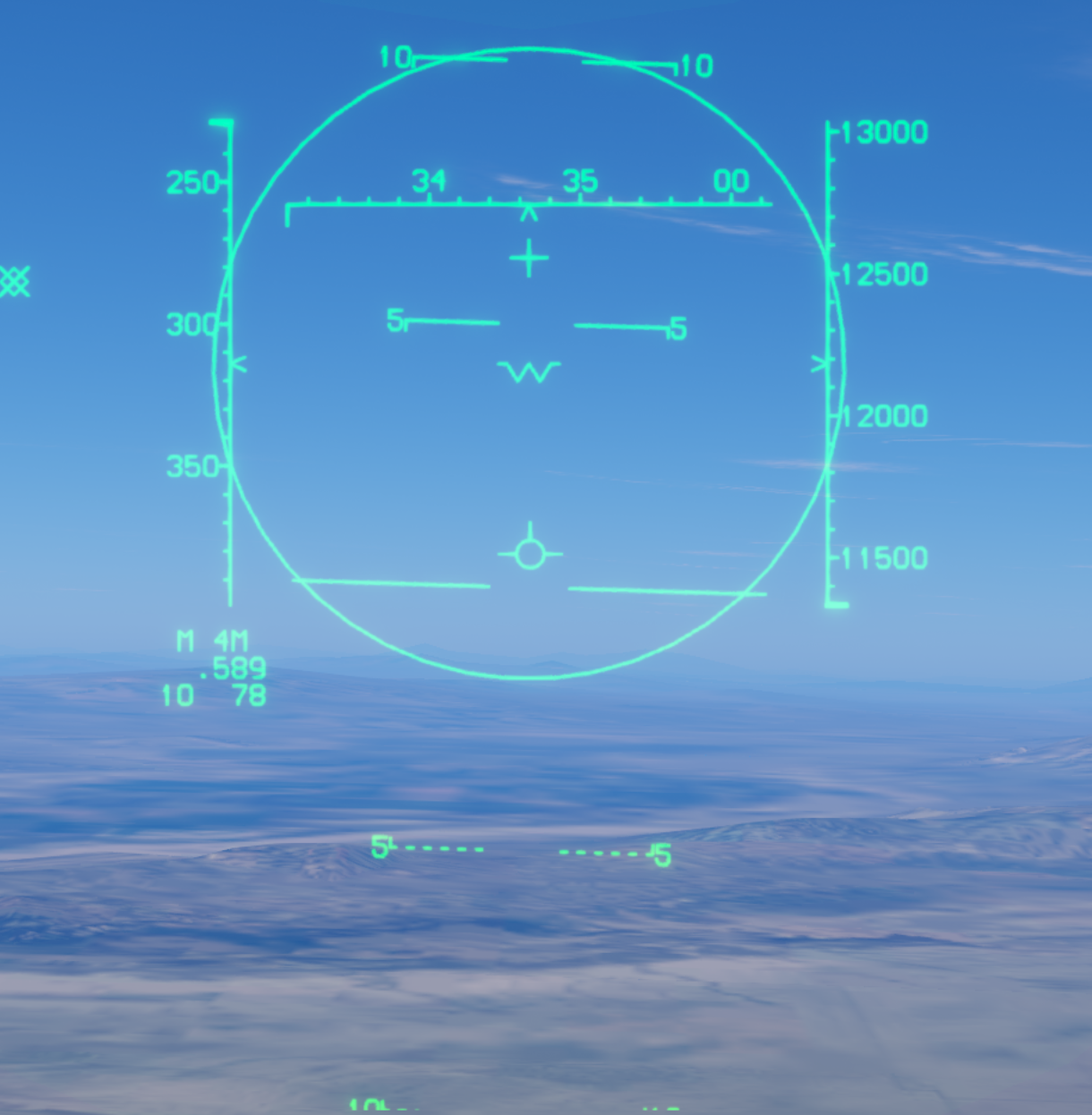
Selecting MR (medium-range missiles) with AIM-7 selected displays a 12° circle representing the radar illumination area in FLOOD mode. In FLOOD, keep the target inside this circle.
This large circle is neither the ASE circle nor the AIM-9 seeker search area. It appears when AIM-7 is selected, so the circle alone does not mean the radar is already in FLOOD mode. See Figure 4 for the actual FLOOD presentation.
Back to AIM-7 index · Back to top
Figure 2 · STT and Launch Cues
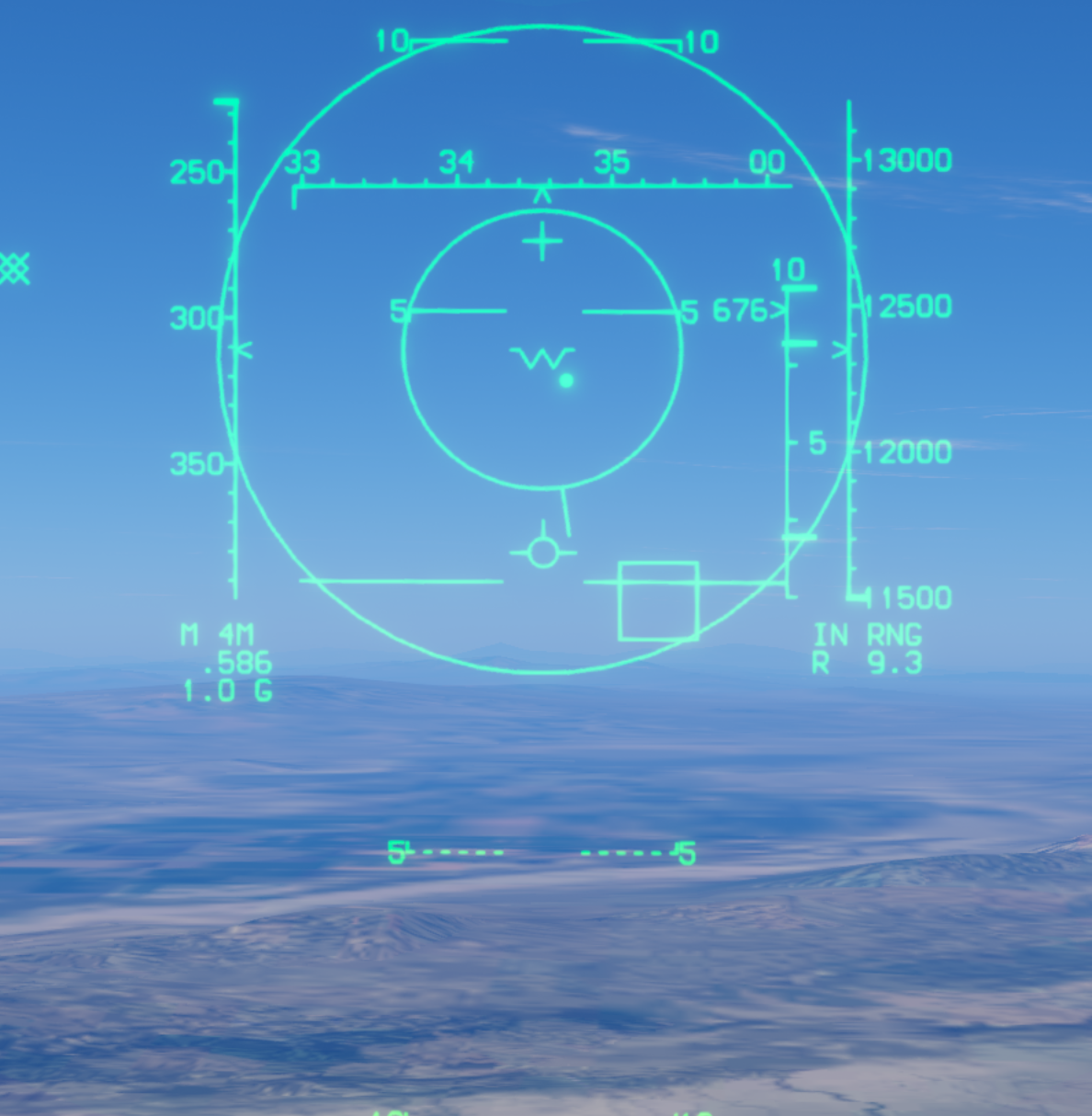
With the radar tracking the target in STT, the HUD provides range and steering cues similar to AIM-9. The outer circle remains the FLOOD illumination reference; the smaller inner circle is ASE, and the bright dot is the steering dot.
- ASE circle and target velocity vector: use the AIM-9M interpretation. The line extending from ASE represents the target velocity vector in a top-down view.
- Steering dot: place the dot inside the ASE circle to reduce post-launch missile turning and conserve missile energy.
- TD box: marks the radar-tracked target's line of sight.
- DLZ range cues: interpret RMax, RTR, and RMin as in the AIM-9 section, using the current AIM-7 calculations.
The figure shows an expanded ASE circle and IN RNG; R 9.3 indicates a slant range of 9.3 nautical miles. These cues help assess range and steering, but the radar must still be in STT when launching. Continue tracking and illuminating the target after launch.
Back to AIM-7 index · Back to top
Figure 3 · Inside RTR
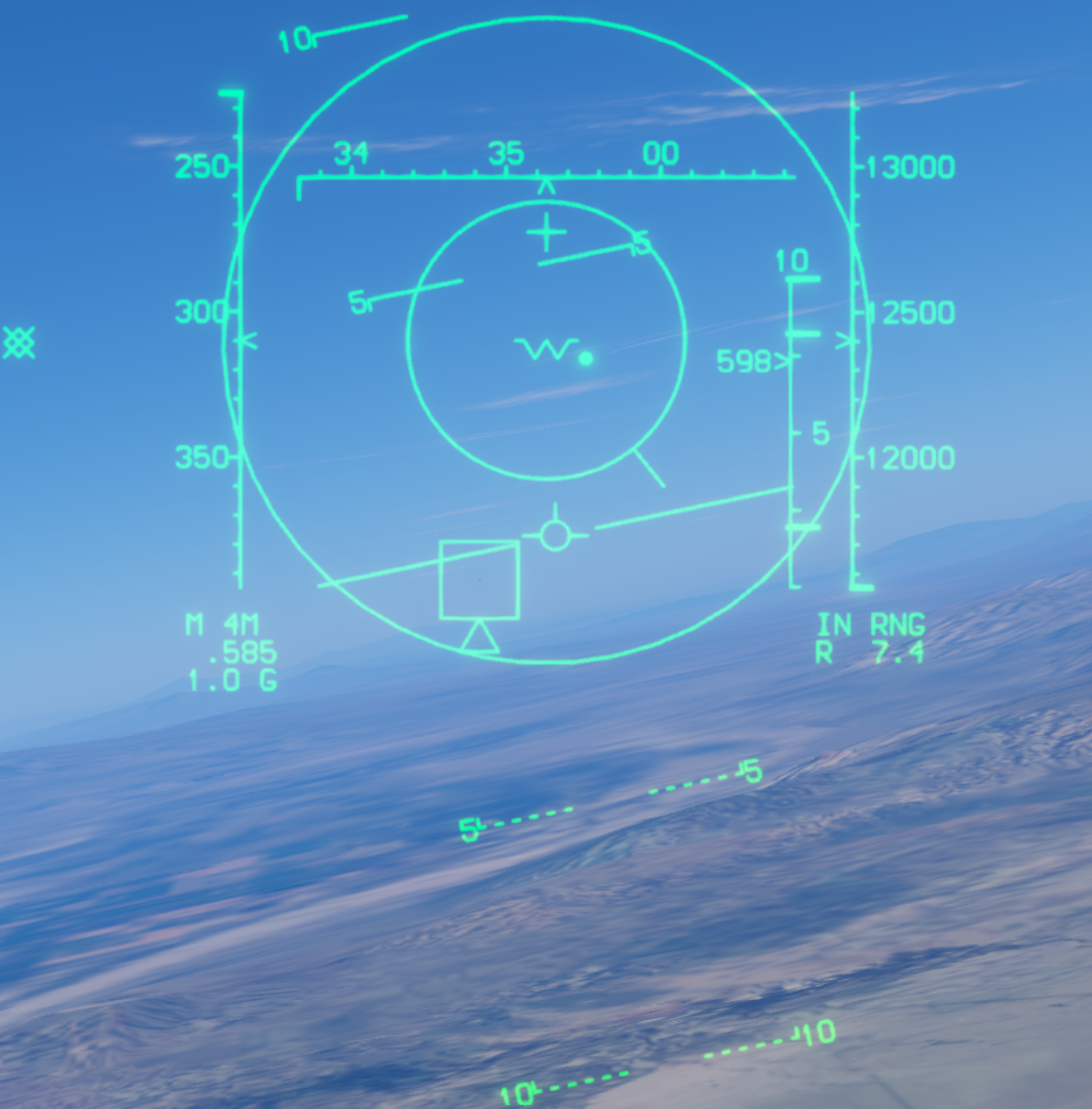
A triangle is visible beneath the target box, and R 7.4 indicates 7.4 nautical miles. Interpret the triangle and flashing ASE as described in the AIM-9 RTR section: they indicate more favorable launch conditions, not a guaranteed hit. A still image cannot show the flashing.
The key difference remains guidance support. AIM-7 requires STT at launch and continued radar illumination afterward. Being inside RTR does not make the missile autonomous.
Back to AIM-7 index · Back to top
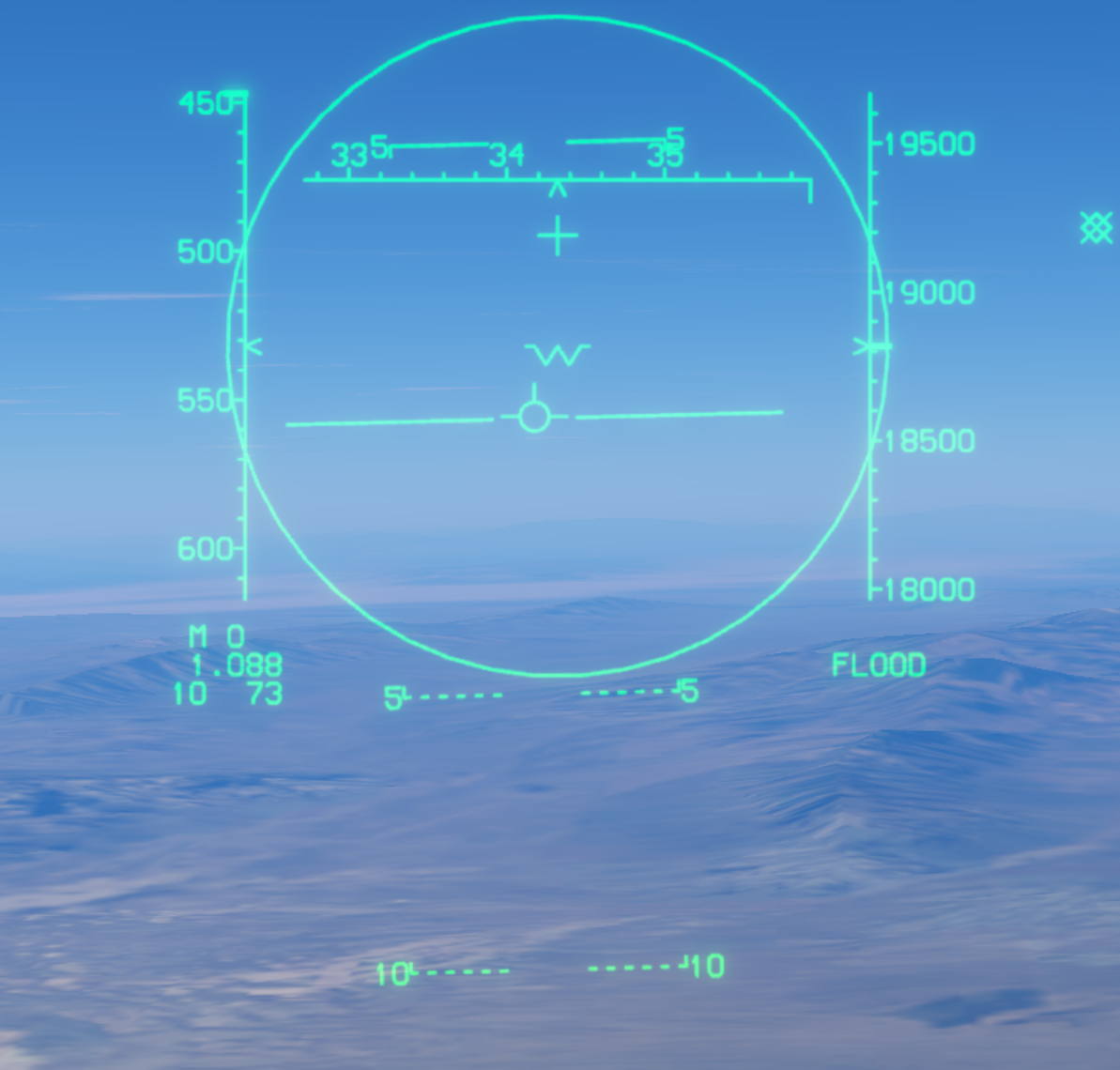
Figure 4 · FLOOD Illumination Mode
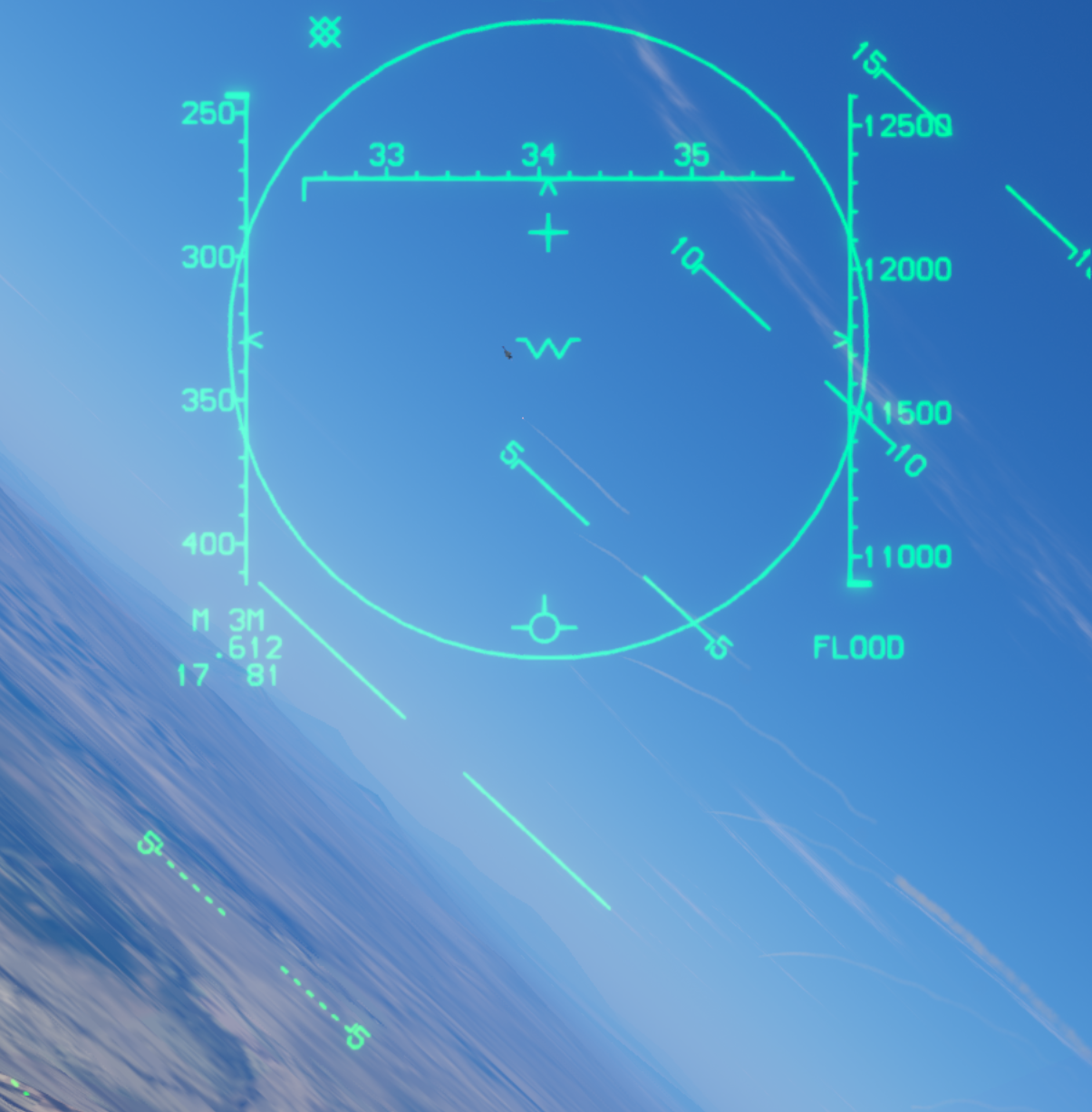
The final figure shows actual FLOOD mode, identified by FLOOD at the lower right. Maneuver to keep the target continuously inside the 12° circle so the radar illuminates it and supplies reflected energy for AIM-7 guidance.
If an AIM-7 has already been launched in STT and the STT lock is lost during missile flight, FLOOD can provide continued illumination support. This describes post-launch support after loss of lock; it does not change this game's requirement to launch AIM-7 in STT.
FLOOD does not automatically establish STT tracking or turn AIM-7 into an autonomous missile. See also FLOOD in the auto-acquisition section.
Back to AIM-7 index · Back to top
AIM-120 AMRAAM Modes
The AMRAAM's ASE circle, steering dot, TD box, and DLZ are interpreted much like those in the preceding AIM-9 and AIM-7 sections. This section describes AIM-120 visual launches in this game and its different target-box cue inside RTR.
Figure 1 · Visual Launch Without a PDT
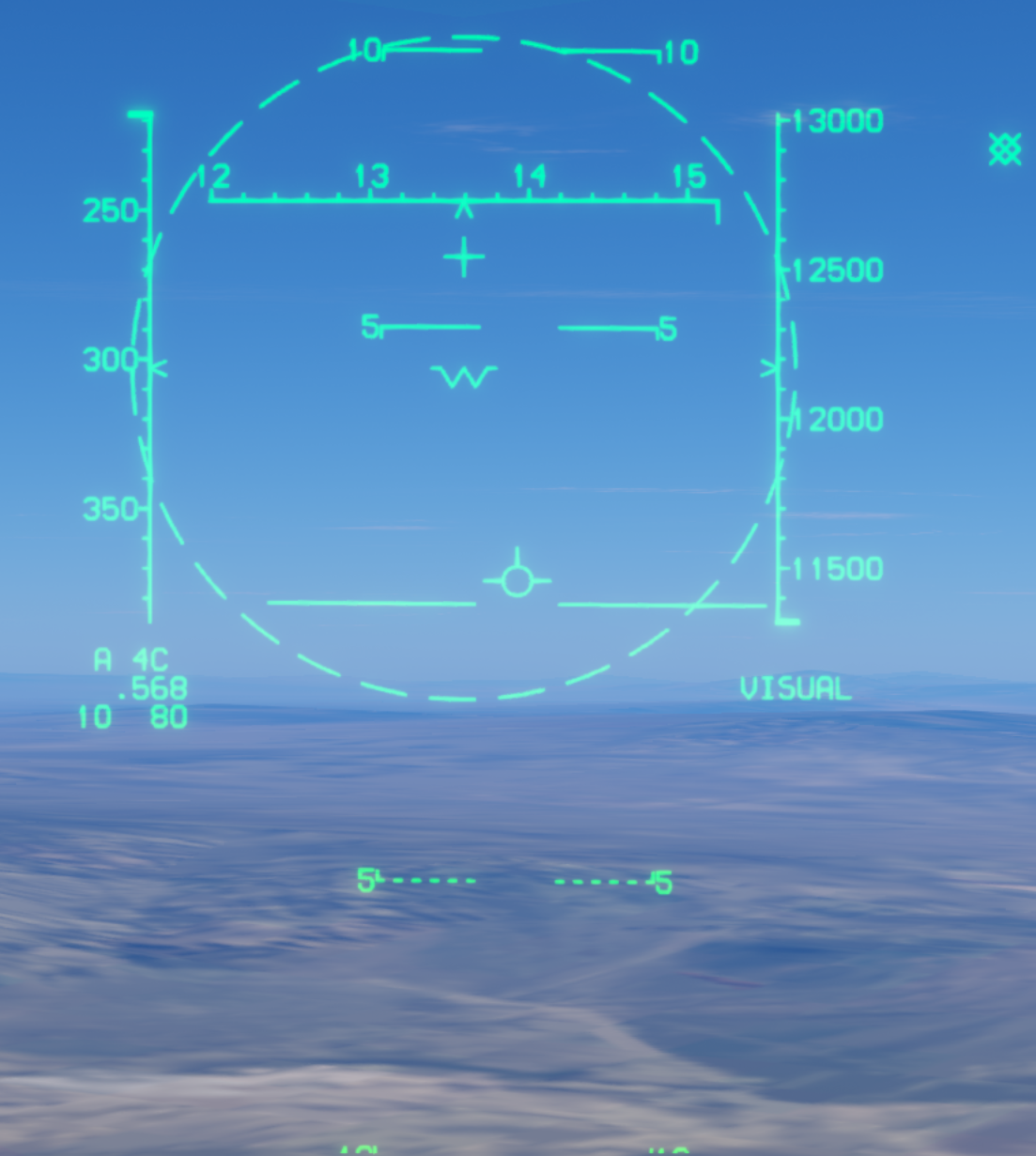
AIM-120 can be launched without a radar PDT. The HUD displays VISUAL and a dashed 12° circle. For a visual launch, confirm that the target is within 10 nautical miles and place it inside this circle.
For more distant targets within that envelope, allow lead for target movement rather than aiming only at the target's current position.
The dashed circle is the AIM-120 visual-mode reference, not an ASE circle or the AIM-7 FLOOD illumination circle. The AIM-7 requirement to launch in STT does not apply to this visual mode.
Back to AMRAAM index · Back to top
Figure 2 · PDT and Range Cues
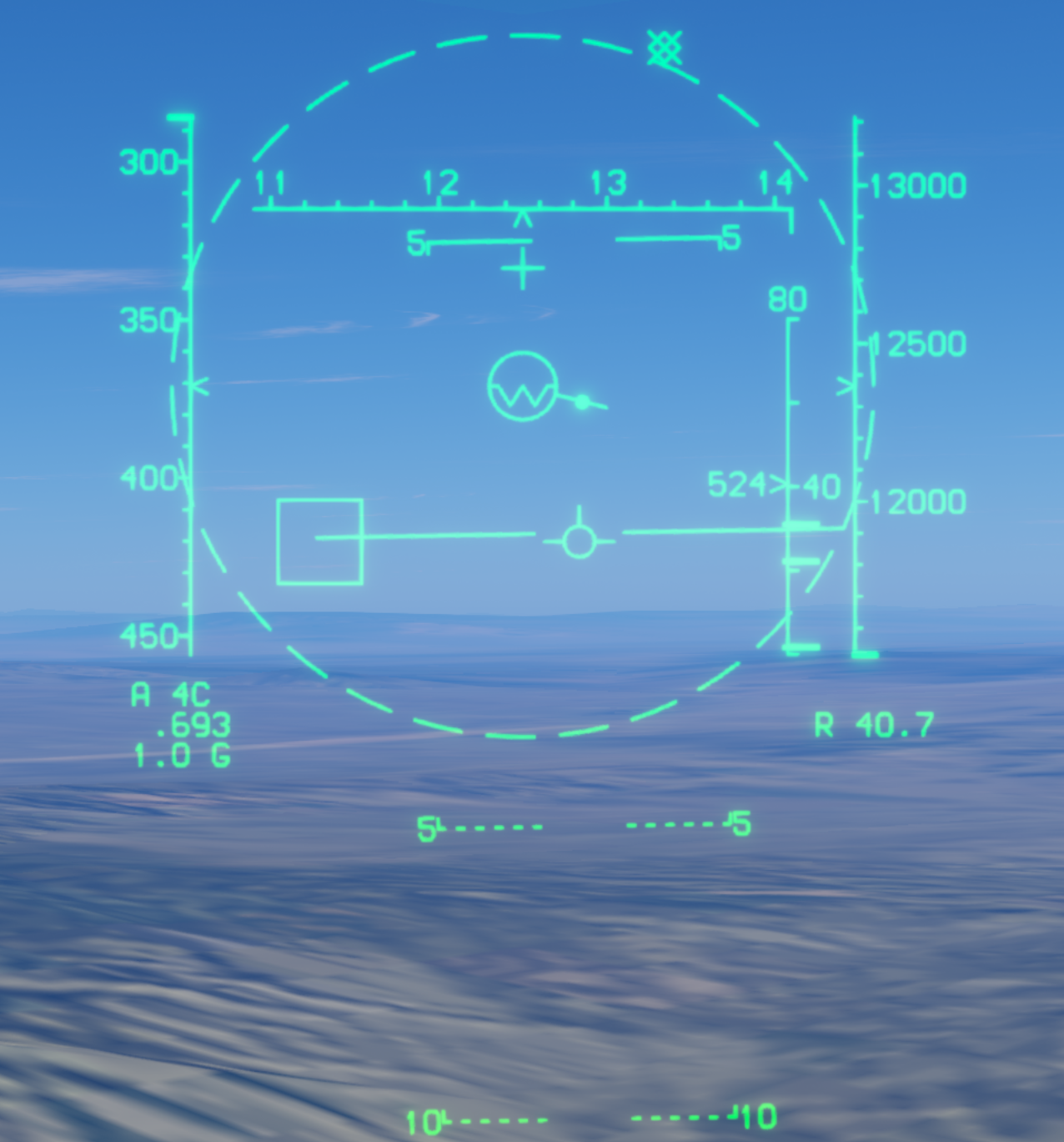
With a radar PDT, the HUD shows the target box, ASE circle, steering dot, and DLZ. Here, R 40.7 indicates a target slant range of 40.7 nautical miles. The ASE circle is reduced, and the target remains beyond the currently calculated maximum range.
Refer to the preceding explanations for the shared symbols:
- ASE and target velocity vector: interpret ASE size changes and the vector extending from the circle in the same way.
- Steering dot: place the dot inside ASE to improve launch steering.
- TD box: marks the radar PDT's line of sight.
- RMax, RTR, and RMin: use the same interpretation, but read the current AIM-120 DLZ calculations.
The 10-nautical-mile condition in Figure 1 applies to visual launches without a PDT. It is not a universal AIM-120 range limit when a PDT is available.
Back to AMRAAM index · Back to top
Figure 3 · In Range
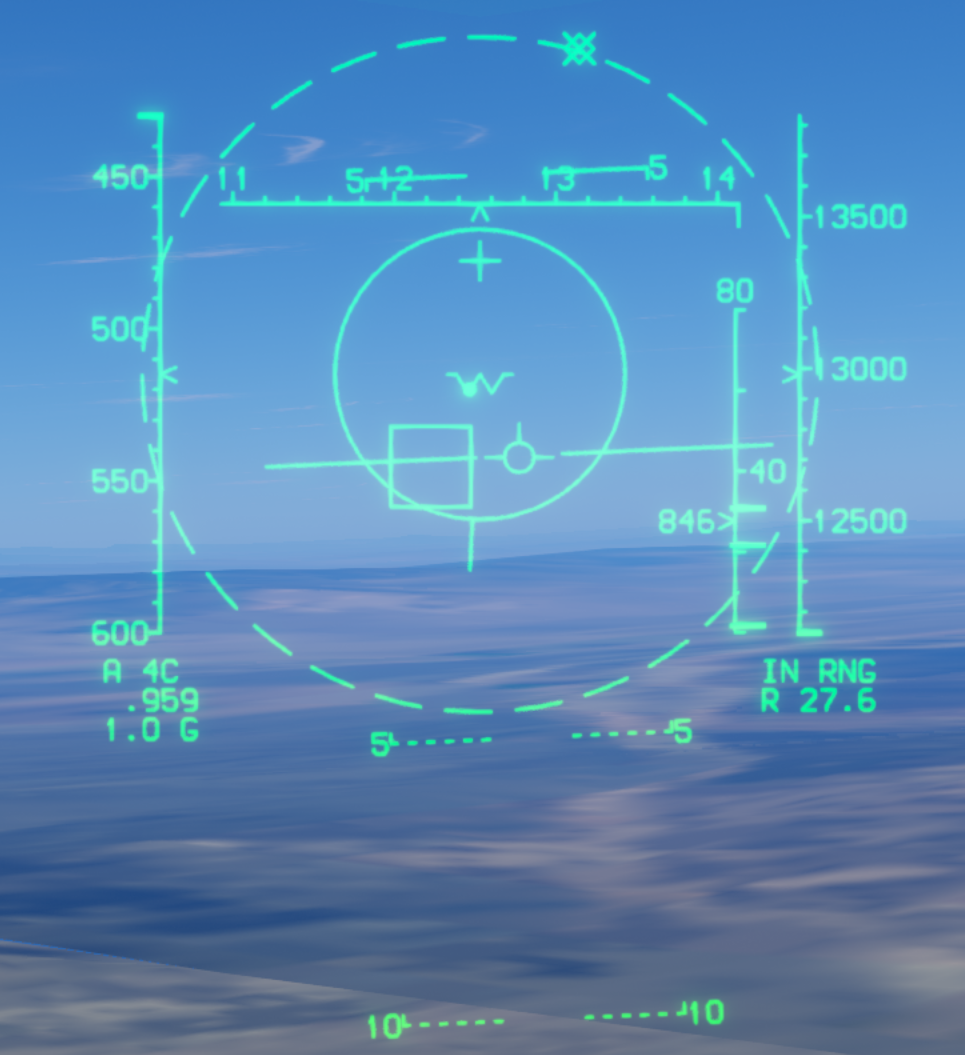
The target is inside the currently calculated launch envelope. The ASE circle expands and IN RNG appears; R 27.6 indicates a slant range of 27.6 nautical miles.
Interpret ASE and DLZ as in the preceding missile sections. Assess the steering dot together with the current range cues; IN RNG does not guarantee a hit. AIM-9 cage/uncage status and infrared lock tones are not the launch criteria here.
Back to AMRAAM index · Back to top
Figure 4 · Six-Point Cue Inside RTR
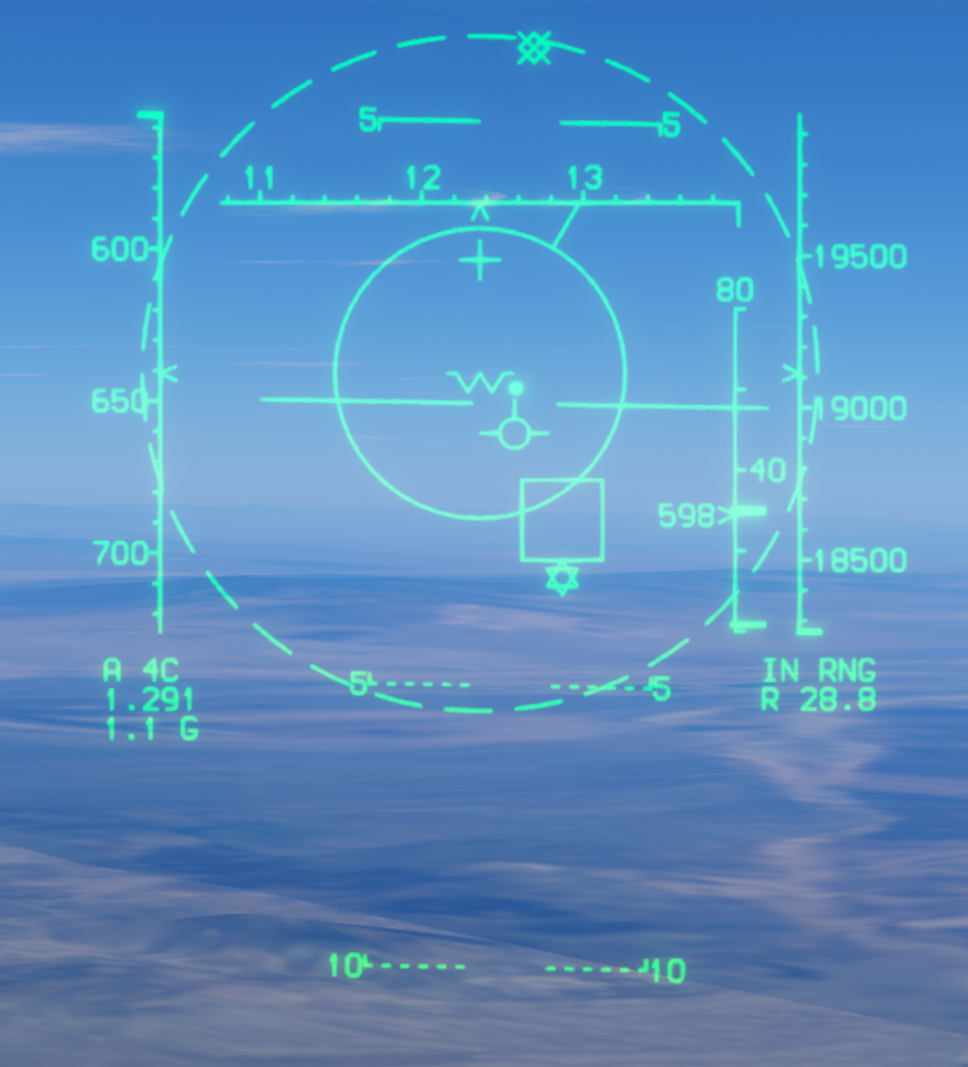
When the target enters RTR, a six-pointed cue appears beneath the TD box, shown here as a six-pointed star. This differs from the triangular cue used for AIM-9 and AIM-7.
See the RTR explanation for its meaning. The cue indicates more favorable launch conditions, not a guaranteed hit; continue to assess ASE, DLZ, and minimum range.
The figure shows R 28.8, or 28.8 nautical miles. RTR changes with current conditions, so the distance shown in any one screenshot is not a fixed threshold.
Back to AMRAAM index · Back to top
Auto-Acquisition Radar Modes
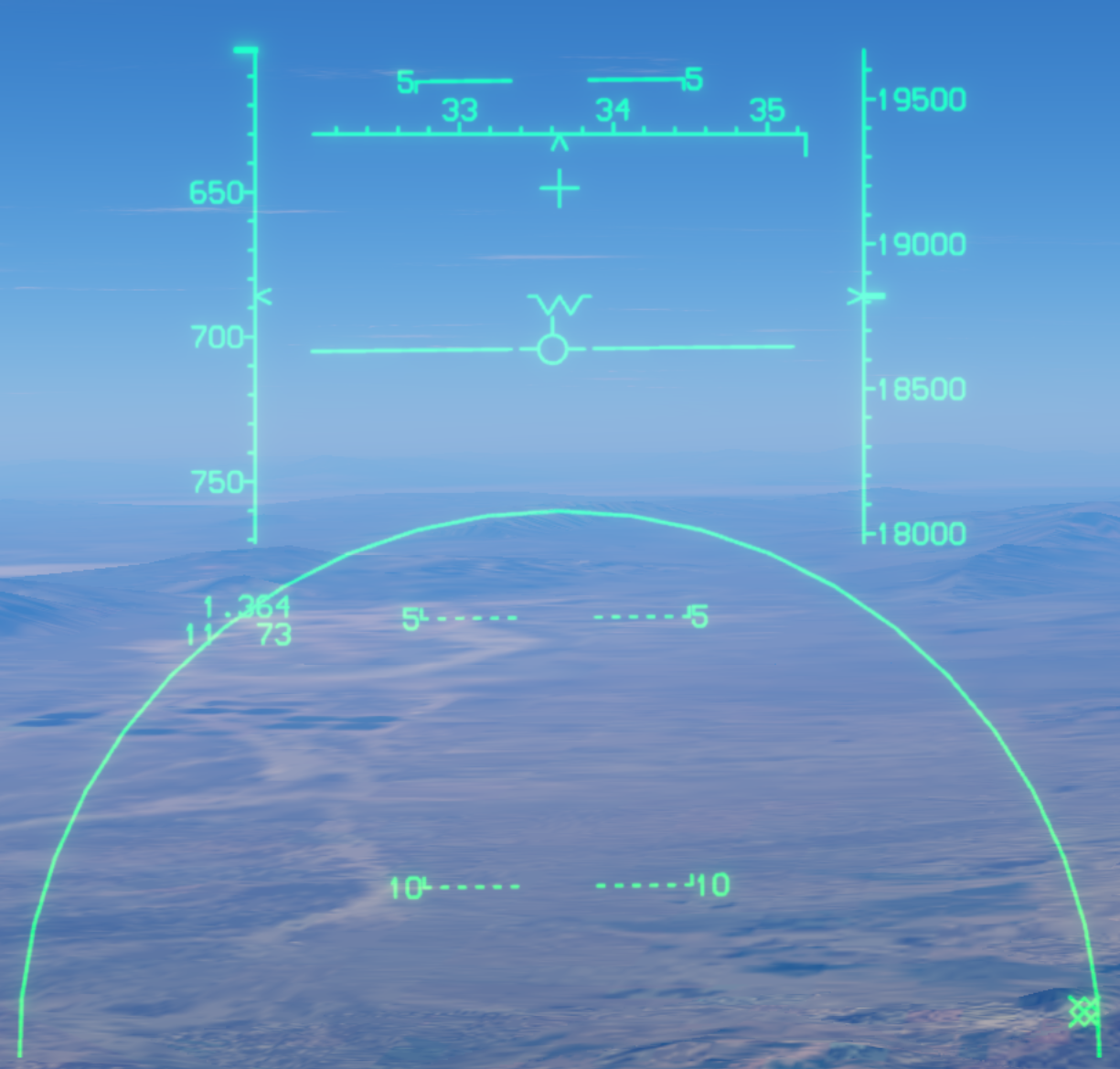
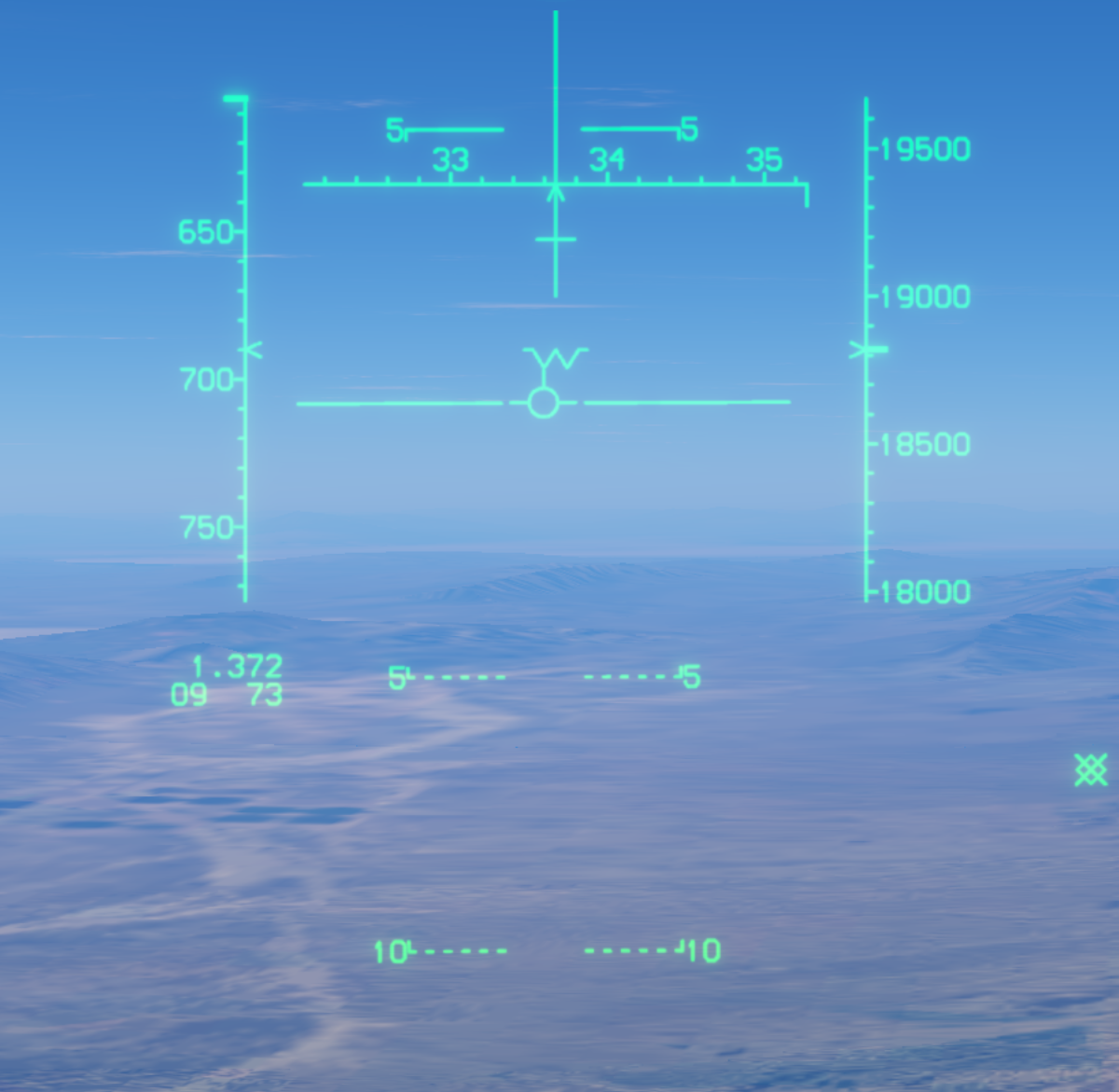
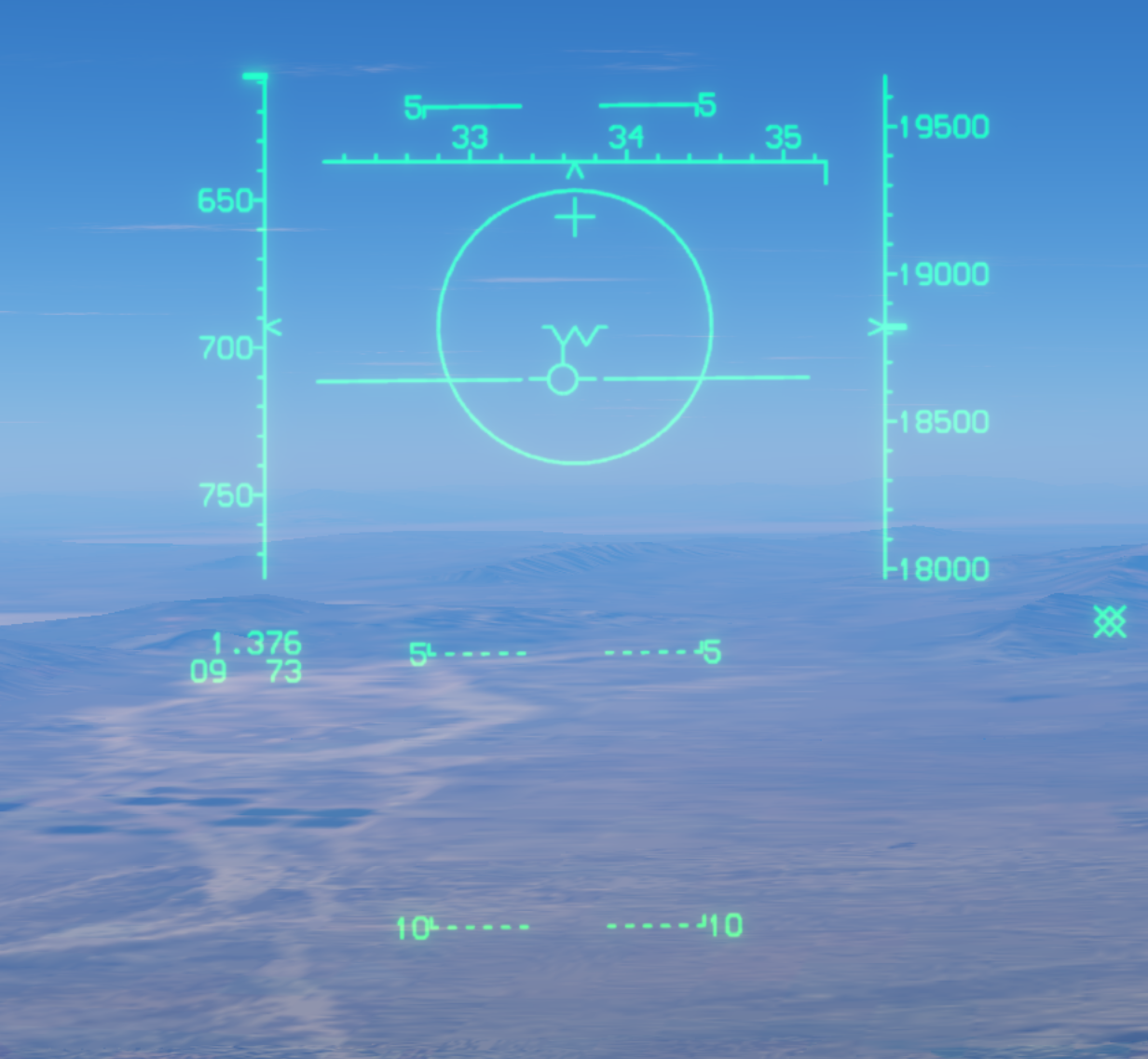
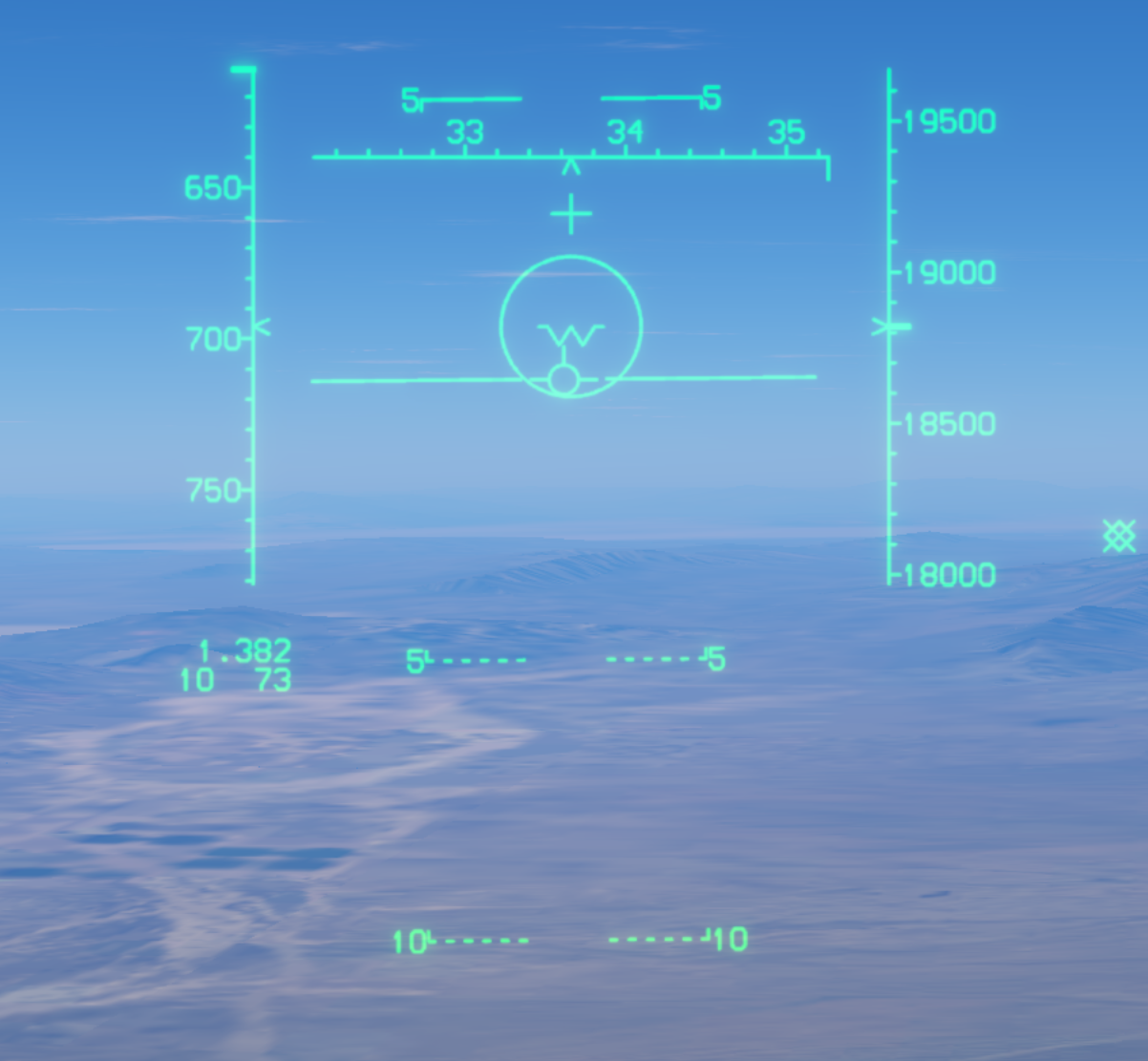
Radar auto-acquisition modes quickly lock targets within the search volume without manual radar-cursor designation. SS, VS, and BST have a maximum automatic lock-on range of 10 NM; LR BST extends this range to 40 NM.
SS — Supersearch
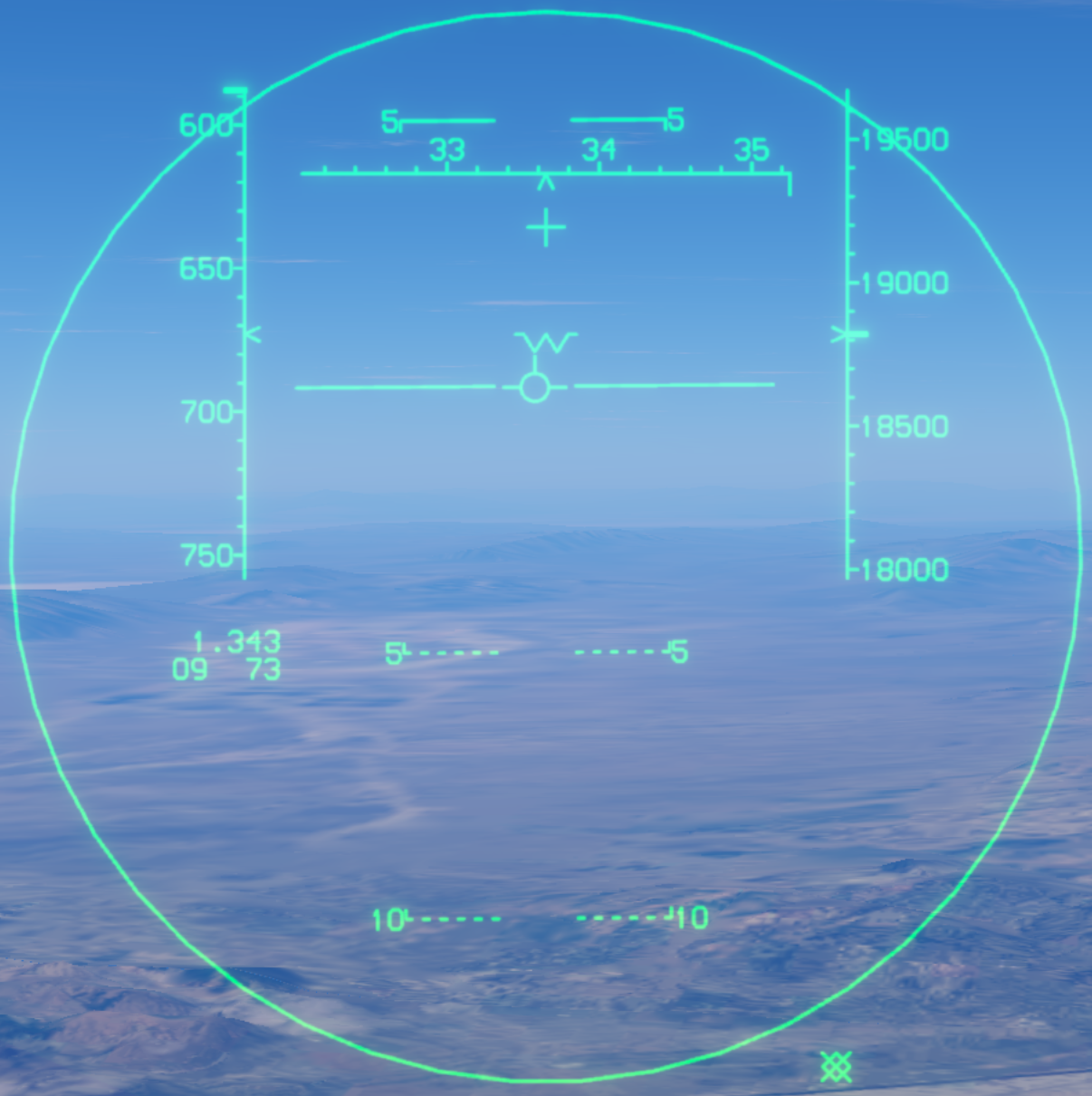
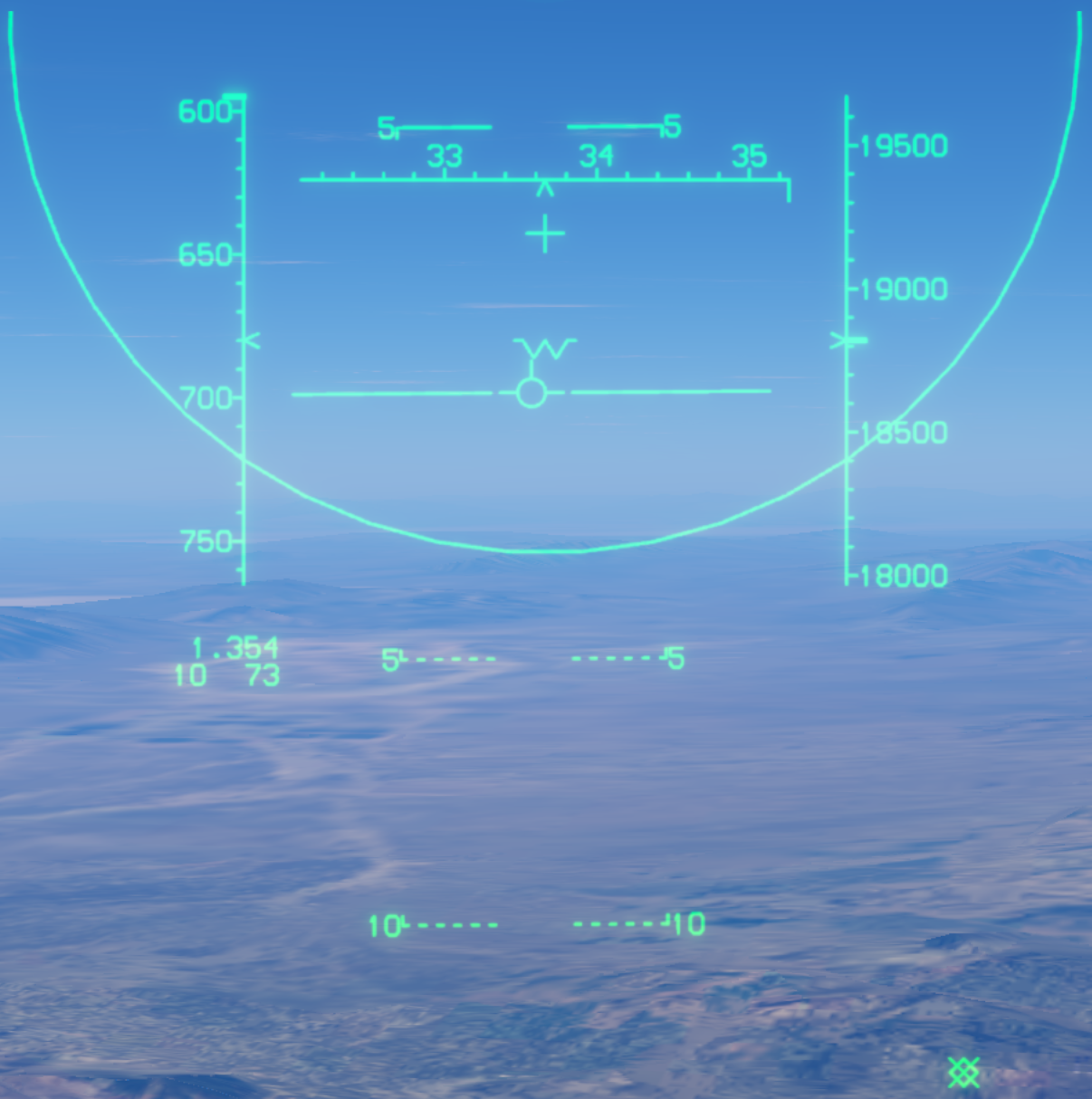
The large HUD circle represents a 20° search area. In this game, use the radar antenna elevation control to shift the search area up or down by as much as 10°. Place the target within the search area for automatic acquisition out to 10 NM.
The images below show the centered, upward-shifted, and downward-shifted search circles. Part of the circle may extend outside the HUD when the search area is shifted.
Back to mode index · Back to top
VS — Vertical Scan
VS uses a two-bar scan covering +5° to +55° above the fuselage reference line (FRL), with an azimuth width of 7.5°.
The vertical HUD line indicates the scan direction; the search volume extends above the HUD. Bring the target into this tall, narrow volume for automatic lock-on out to 10 NM.
Back to mode index · Back to top
BST — Boresight
BST searches along the radar boresight. Place the target inside the HUD boresight circle for automatic lock-on out to 10 NM.
Back to mode index · Back to top
LR BST — Long-Range Boresight
LR BST works similarly to BST, but uses a smaller HUD search circle and extends the maximum automatic lock-on range to 40 NM. Keep the target inside the smaller circle to acquire it at greater distances than SS, VS, or BST allows.
Back to mode index · Back to top
FLOOD — Flood Illumination
FLOOD is normally used with the semi-active radar-homing AIM-7. It illuminates an area ahead of the aircraft without establishing an STT lock as the auto-acquisition modes do.
If STT lock is lost while an AIM-7 is in flight, switch to FLOOD to continue illuminating the target and provide reflected radar energy for missile guidance. Maneuver the aircraft to keep the target inside the HUD illumination circle for continued guidance support.
The HUD displays the illumination circle and the FLOOD cue. The target must remain illuminated after switching modes; the missile does not become self-guiding.