Radar mode index
Long Range Search (LRS)
LRS searches for distant airborne targets before lock-on, showing their bearing and range relative to ownship for subsequent acquisition and tracking. A VSD display range of 40–80 nautical miles is commonly used to observe distant returns. This is the display scale, not a guarantee of detection at that range for every target.
Adjust antenna elevation and azimuth coverage to include the expected target area. Place the acquisition gate over a return and initiate manual acquisition; successful acquisition enters STT. LRS locates targets, while subsequent tracking modes provide focused tracking.
The horizontal axis represents azimuth; the vertical axis represents range, increasing toward the top.
Tap the Touch UI AA (Auto Acquisition) button once to switch from radar standby to LRS. Tap it again to return to standby.

For other button actions, see Touch UI: Auto Acquisition.
Scan bars
The initial LRS scan after tapping AA defaults to 120° azimuth coverage and 6 bars.
A bar is one horizontal antenna sweep at a given elevation. Multiple bars cover an altitude volume through successive sweeps at different elevations; a six-bar scan completes six such sweeps. Bar spacing is the separation between adjacent bars and varies with the search range rather than remaining fixed.
To change the LRS bar count, open Touch UI: 1. Function Panel and select the scan bars on the MAIN page.
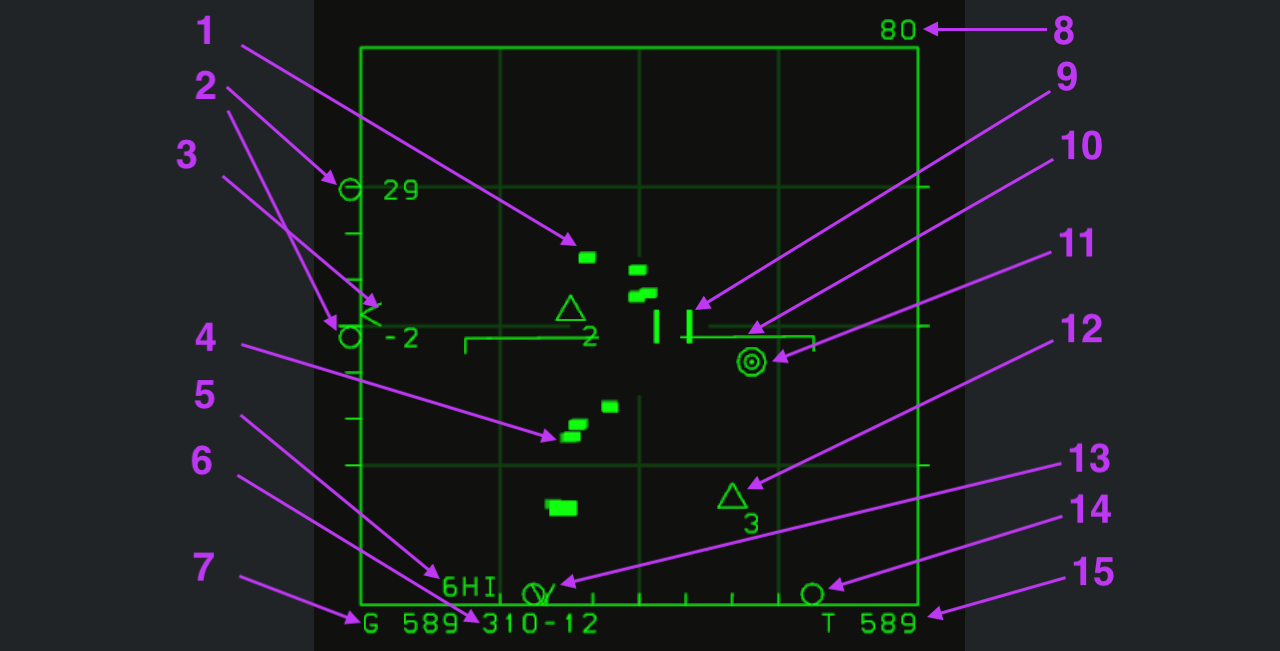
Click an image to view its original resolution; click a number below it to jump to the explanation.
Numbered symbols
1. Radar returns
Short green blocks indicate detected search returns. Their positions provide bearing and range references, but do not indicate lock-on or identify friend or foe by shape alone.
2. Altitude coverage
The two circles and numbers on the left show the scan ceiling and floor at the acquisition gate's range, in thousands of feet. Here, 29 and -2 indicate approximately 29,000 to -2,000 feet. The negative value describes scan geometry, not an underground target. Recheck coverage whenever gate range or antenna elevation changes.
3. Antenna elevation indicator
The caret on the left scale indicates antenna elevation. Read it with the altitude coverage in item 2; it is not a target-altitude marker.
The left scale has six divisions covering +60° to -60°. Read antenna elevation from the caret's position: 0° at the center, positive above and negative below.
Use the antenna ELE knob to control elevation. On touch devices, use the control shown below while observing the left caret and altitude-coverage readouts.

See Touch UI: Antenna Elevation.
4. Return history
Return history retains positions from previous scans to show movement. Distinguish historical positions from the current return instead of treating every block as a separate target.
5. Scan bars and PRF
6HI is the scan-bar and pulse repetition frequency (PRF) status readout; HI indicates high PRF.
6. Acquisition-gate bullseye coordinates
This readout gives the bearing and range of the acquisition gate (item 9) from the common Bullseye reference. 310-12 places the gate on bearing 310°, 12 nautical miles from Bullseye.
In future multiplayer sessions, these coordinates can be used to communicate positions with teammates. Move the gate to the position to report and read its bullseye coordinates.
7. Ownship ground speed
G 589 indicates an ownship ground speed of 589 knots: speed relative to the ground.
8. Maximum VSD display range
The upper-right 80 sets the current VSD display limit to 80 nautical miles. It is neither a target range nor the radar's maximum detection range.
Move the acquisition gate beyond the display boundary to change the range scale:
- Above the top edge: increase the maximum display range.
- Below the bottom edge: decrease the maximum display range.
9. Acquisition gate
Two vertical bars form the acquisition gate, used to select a position or raw return. Its range also determines where the altitude coverage in item 2 is evaluated.
Move the gate with the Cursor (TDC control) button on the right of the Touch UI, shown below. Moving it beyond the display edges also adjusts display range and azimuth coverage.

See Touch UI: Cursor.
To acquire a target manually:
- Place the acquisition gate around a raw radar return.
- Double-tap the right-side Cursor (TDC control) button to initiate acquisition.
- Successful acquisition automatically enters STT (Single Target Track) and tracks that target.
10. Local horizon reference
The horizontal line with downturned ends is the local horizon reference. A centered line indicates level flight; its rotation indicates aircraft roll. It maintains an attitude reference while you watch the radar.
11. Bullseye reference
Bullseye is the common reference for reporting bearing and range. See item 6 for the acquisition gate's bullseye coordinates.
12. Navigation point 3
The arrow points to navigation point 3. The open triangle marks its position and 3 is its navigation-point number.
13. Antenna azimuth indicator
The bottom caret indicates the antenna's current azimuth. Distinguish it from the circular scan-limit markers: it shows antenna direction, not target heading.
During scanning, the symbol moves left and right with the antenna, showing its direction in real time.
14. Azimuth scan limits
The two circles at the lower left and right mark the scan boundaries; the arrow points to the right boundary. They define scan width rather than two aircraft.
Move the acquisition gate beyond the lateral edges to change azimuth coverage:
- Beyond the left edge: narrow the azimuth scan.
- Beyond the right edge: widen the azimuth scan.
Azimuth coverage ranges from 10° to 120°. This changes scan width, not the display range in item 8.
15. Ownship true airspeed
T 589 indicates an ownship true airspeed of 589 knots relative to the surrounding air. This differs from ground speed in item 7, even when the two values happen to match.
Single Target Track (STT)
STT concentrates on one target, continuously providing position, motion and weapon-solution data. From LRS, place the gate around a raw return and double-tap the right-side Cursor button; successful acquisition enters STT. See Acquisition gate.
Unlike LRS area search, STT maintains focused tracking of the selected target for gun aiming and missile employment. In this game, AIM-7 requires STT at launch and radar illumination afterward. STT also supports AIM-120, but the two missiles have different guidance requirements.
STT triggers the opposing aircraft's radar-lock warning. At close range, the target may dispense chaff or notch to break the lock or degrade your launch conditions. Continue monitoring target maneuvers, tracking status and the dynamic launch zone.
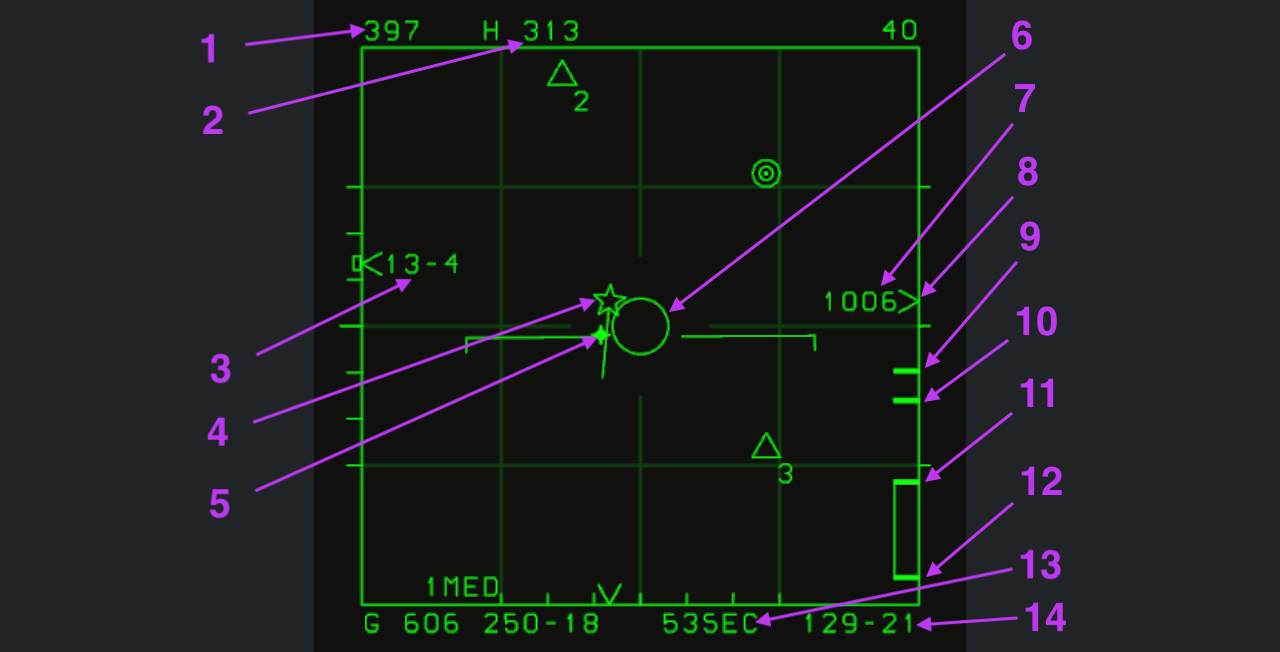
Figure 1: the target is outside maximum range and the ASE circle is small.
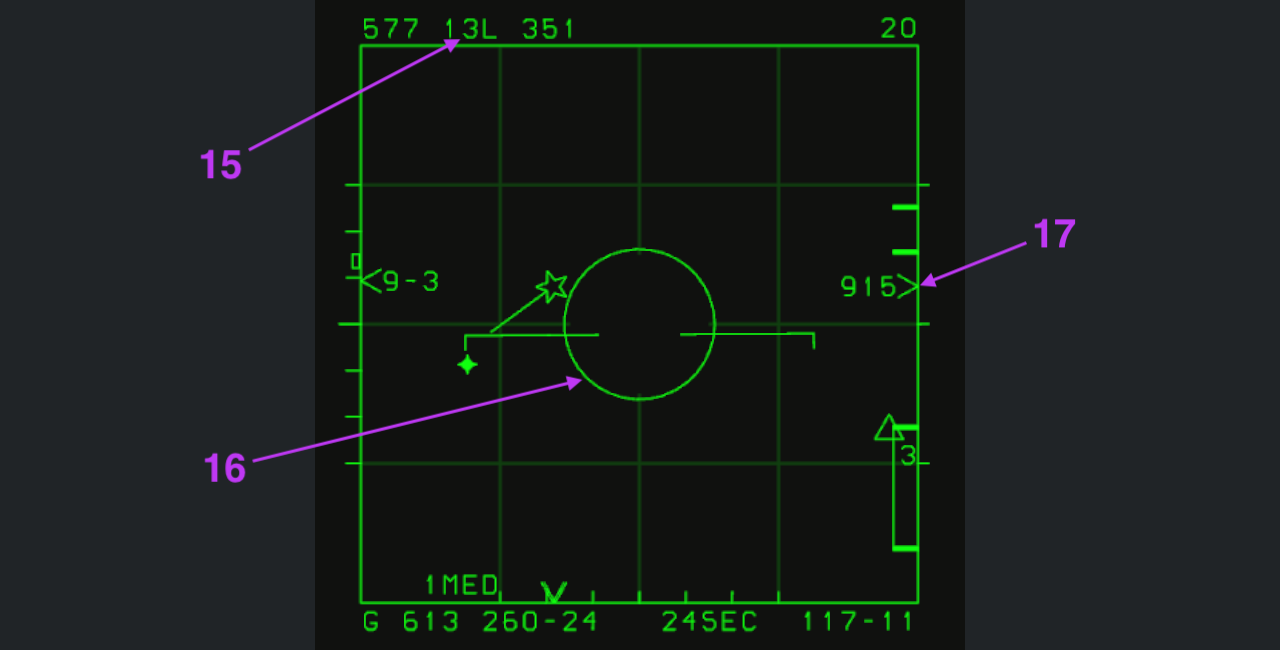
Figure 2: the target enters maximum range and the ASE circle begins to expand.
Click either image for its original resolution, or the numbers below it for explanations. Both examples have AIM-7 selected. Refer to LRS for shared symbols such as the range grid, local horizon and navigation points. The upper-right 40 in figure 1 means a 40-nautical-mile display range; 20 in figure 2 means 20 nautical miles.
1. Target true airspeed
The upper-left 397 is target true airspeed in knots, not ownship speed. The 577 at the same location in figure 2 indicates 577 knots.
2. H/T aspect and target heading
H means HOT: the target is nose-on to ownship, a threatening aspect for a hostile aircraft. T is shown when it faces away. These indicate relative aspect, not identification as friend or foe.
The following 313 is the target's heading of 313°, not ownship heading. H/T describes relative aspect, while the number gives heading. See item 15 for left/right aspect angles.
3. Target altitude
The left-side 13-4 means 13,400 feet MSL, measured above mean sea level.
4. PDT — primary designated target
The five-pointed star marks the PDT (Primary Designated Target) in the azimuth–range display. Its long forward line indicates the direction of the target's velocity.
5. Steering dot
The bright point is the steering dot. At missile launch, place the ASE circle (item 6) around it to reduce the missile's required turn and conserve energy. This follows the same logic as the HUD steering dot.
6. ASE circle
The circle represents Allowable Steering Error (ASE). Launch conditions only begin to be met when it expands. A steering dot inside a small ASE circle is not enough to establish launch readiness.
After expansion, still assess the steering dot, range and selected missile's guidance requirements. See the matching HUD ASE explanation.
7. Closure rate
1006 is the closure rate between ownship and the target, in knots. It describes the rate of range change, not target airspeed.
8. Target range indicator
The right-side > indicates target position on the current range scale. Read it against the upper-right 40-nautical-mile scale. Adjacent 1006 is closure rate, not range.
9. Rmax — maximum range
The first (uppermost) short tick is Rmax, the maximum range under the current calculated conditions.
10. Optimized maximum range
The second short tick indicates optimized maximum range.
11. RTR range reference
The top of the long box is RTR (Range Turn and Run), the range reference accounting for a target that turns away, commonly called no-escape range. It indicates relatively favorable launch conditions, not a guaranteed hit.
12. Minimum range
The bottom of the box is RMin (minimum range). Compare target range against this mark: being closer does not always mean better launch conditions.
Marks 9, 10, 11 and 12 together form the DLZ (Dynamic Launch Zone). It changes with ownship altitude, altitude separation, target direction and speed, ownship speed and other factors.
Evaluate these factors before launch. While preserving ownship safety and respecting minimum range, close the distance as much as practical before firing.
13. Missile time readout
53SEC predicts a hit 53 seconds after launching now. It is calculated from the current engagement geometry, not a countdown for a missile already fired.
The estimate is accurate only if the target maintains its motion without turning after launch. Heading or speed changes also change the actual time to impact.
14. Target bearing and range
The lower-right 129-21 gives target bearing and range relative to ownship: 129° and 21 nautical miles. Bearing is in degrees and range in nautical miles; do not confuse it with bullseye coordinates.
15. Target aspect angle
In figure 2, 13L indicates a target nose direction of 130° to the left; 13R would mean 130° to the right. The number is in tens of degrees; L and R indicate left and right.
This is aspect relative to ownship, not a heading of 130°. The following 351 is target heading, 351°. Read it together with H/T and heading in item 2.
16. Expanded ASE circle
Figure 1 is outside maximum range with a small ASE circle; in figure 2 the target enters calculated maximum range and the circle expands. As in item 6, assess it with the steering dot and range marks. AIM-7 is selected, so expansion does not remove radar tracking and illumination requirements.
17. Figure 2 range and closure
The arrow points to the same target-range > as item 8. Read figure 2 against its 20-nautical-mile scale, not figure 1's 40-nautical-mile scale.
Adjacent 915 indicates 915 knots closure, as in item 7.
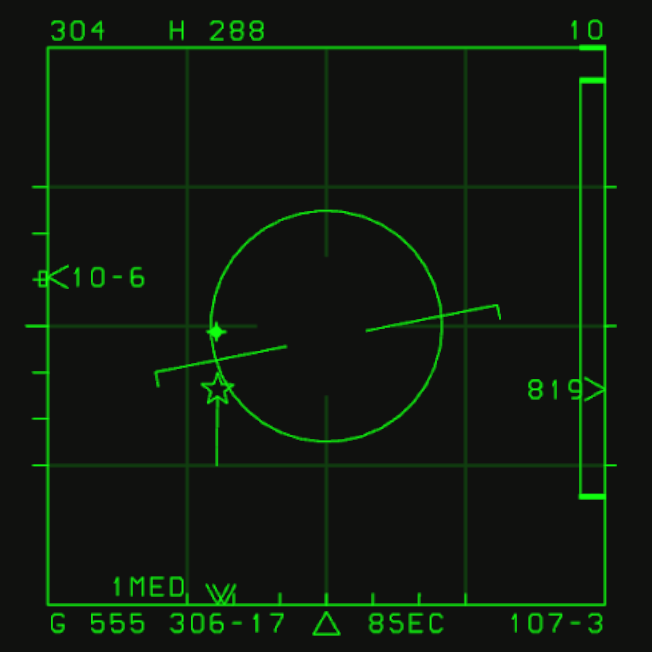
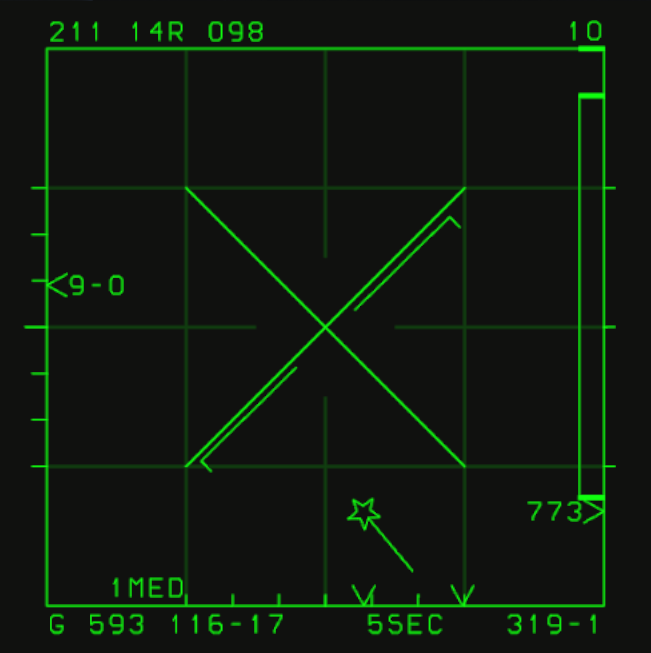
Figure 3 · Entering RTR: triangle launch cue
When the target enters RTR, a triangle appears at the bottom of the VSD to indicate favorable launch conditions. Here it is at bottom center, left of 8SEC.
Before launch, still assess ASE, steering dot and minimum range, and maintain the radar tracking and illumination needed by AIM-7. The triangle does not guarantee a hit.
Figure 4 · Below minimum range: Break X
Below minimum launch range, a crossed Break X appears in the center of the VSD, indicating that you must not fire.
At very short range, the missile may not accelerate to the required speed in time. Even on a hit, ownship's flight path could pass through the fragmentation area. Lock-on and proximity alone are therefore insufficient; always respect minimum range.
Track While Scan (TWS)
TWS maintains multiple target tracks while continuing to scan. It is primarily used within 40 nautical miles and mainly supports AIM-120 employment.
To maintain a high refresh rate, TWS limits combinations of scan bars and azimuth coverage. Wider coverage allows fewer bars. Selecting azimuth coverage automatically selects the bar count; no separate bar selection is required.
| Azimuth coverage | Automatically selected bars |
|---|---|
| 60° | 2 bars |
| 30° | 4 bars |
| 15° | 6 bars |
Entering TWS
There are two ways to enter TWS:
- With a locked target: move AA (Auto Acquisition) down from STT to enter TWS.
- Without a locked target: place the acquisition gate in empty space, double-tap TDC (the right-side Cursor button) for manual acquisition and quickly move AA down at the same time.
See Touch UI: Cursor and Auto Acquisition.
Because TWS also scans other airspace, individual targets refresh less frequently than in STT. Resolution is also limited at long range. High-G maneuvers, chaff or a formation splitting after being resolved as one target can prevent new returns from correlating with existing tracks, causing track loss.
Leaving TWS
- With a PDT: use AA Down to enter STT on that PDT and discard all other track files.
- Without a PDT: tap AA once to return to LRS.
Track categories
TWS distinguishes non-designated, primary designated and secondary designated targets. The capacities below apply to this game.
TWS automatically builds track files for detected targets. Newly detected targets initially appear as squares without velocity vectors. Vectors appear once subsequent scans gather enough information to establish the tracks.
| Category | Meaning | Capacity |
|---|---|---|
| NDT (Non-designated Target) | Not yet selected as primary or secondary | Up to 16 |
| PDT (Primary Designated Target) | Current primary target of interest and engagement | One at a time |
| SDT (Secondary Designated Target) | A secondary designated target available for later selection | Up to 7 |
These categories describe designation, not friend-or-foe identification. Without a PDT the mode is NDTWS; with a PDT it is DTWS.
Designating and switching PDT

Once tracks are established, use Coolie Up (move the Coolie switch upward) to designate targets:
- Automatic designation: Coolie Up automatically designates a PDT and SDTs.
- Cycling: subsequent Coolie Up inputs cycle the PDT through the SDTs.
- Manual designation: place the gate over an NDT or SDT and use Coolie Up to make that target the PDT.
Only one PDT can exist at a time. Designating another target demotes the previous PDT to SDT.
Coolie Down cancels all designations, returns PDT and SDTs to NDT status, and restores NDTWS.
AIM-120 multi-target engagement
In TWS, weapons can be fired only at the current PDT. AIM-120 supports simultaneous engagements by switching PDT and launching sequentially:
- Fire AIM-120 at the current PDT.
- Cycle with Coolie Up, or manually designate the next PDT using the gate and Coolie Up.
- Fire AIM-120 at the new PDT.
After the previous target becomes an SDT, datalink updates can continue supporting the missile already fired. Changing PDT does not end support for the previous missile; maintain the relevant tracks.
Figure 1 · Non-designated targets
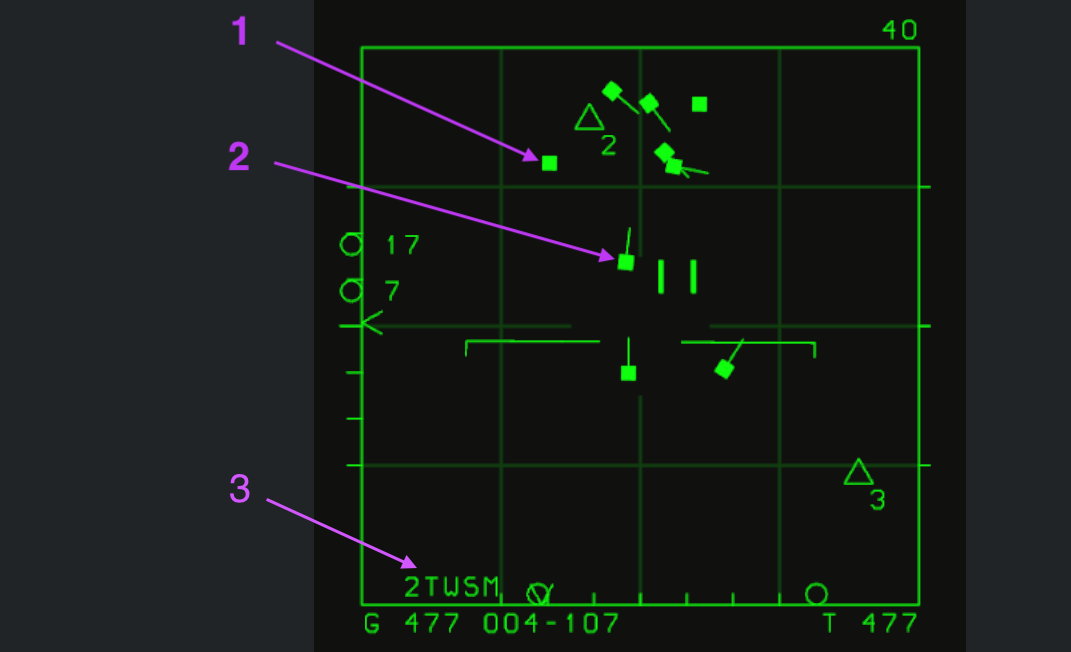
Click an image to view its original resolution; click a number below it to jump to the explanation.
1. Target without an established track file
The arrow marks a newly detected target: a filled square without a velocity vector because insufficient tracking information is available. Further scans establish the track and add the vector shown in item 2.
2. NDT — non-designated target
A filled symbol with a velocity vector represents an established NDT track. The line indicates motion direction. The radar creates the track automatically, without manual designation; it has not been selected as PDT or SDT. This game supports up to 16 NDTs.
3. TWS status readout
The lower-left 2TWSM is the radar status: TWS is Track While Scan, M is medium PRF (MPRF), and the preceding digit is the scan-bar indication.
Figure 2 · Primary and secondary designated targets
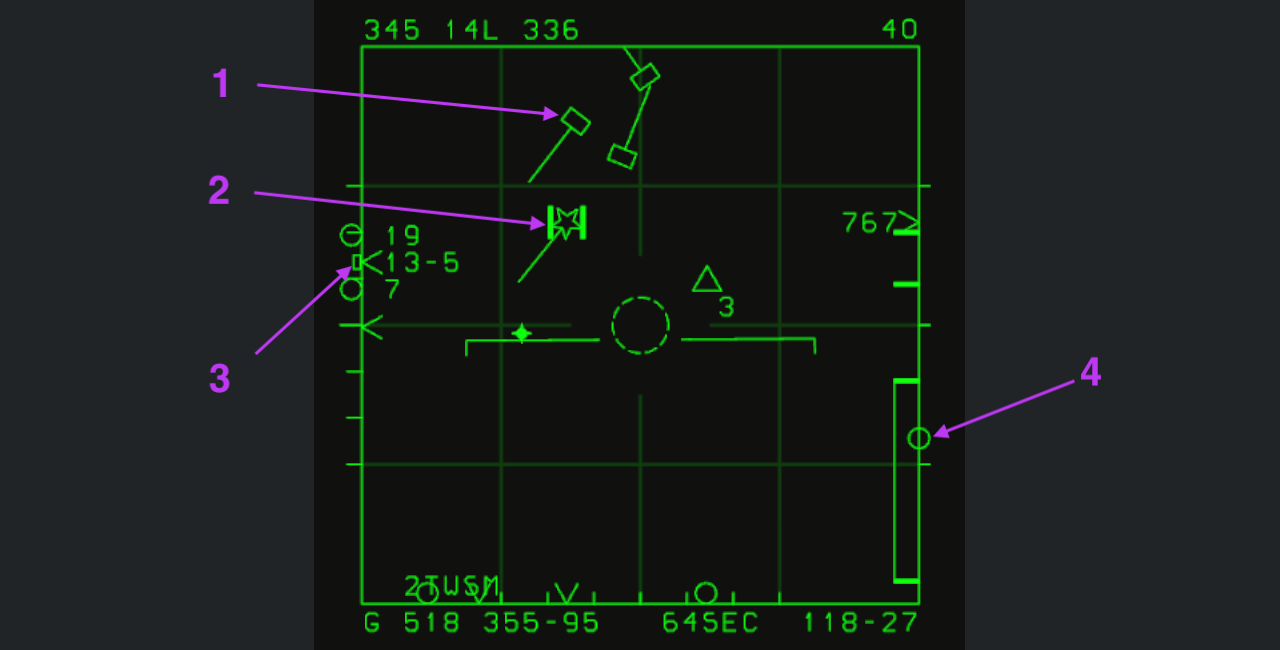
1. SDT — secondary designated target
An open target symbol with a direction vector represents an SDT: designated, but not the current PDT. Up to 7 SDTs are supported in this game.
2. PDT — primary designated target
The five-pointed star is the PDT and its long forward line indicates velocity direction. The gate is over the target in this image. As the primary target of interest and engagement, the PDT is the basis for VSD target data and weapon calculations.
After a PDT is designated, the cursor automatically encloses it and follows its movement. You can move the cursor away manually; when you move it back near the PDT, it automatically snaps onto and encloses the target again. While the cursor encloses the PDT, the radar centers its azimuth scan range on the PDT's azimuth and its elevation scan range on the PDT's elevation. In this state, some track files outside the scanned volume may stop receiving updates and be dropped.
There is only one PDT; other designated targets remain SDTs. The distinction is designation priority, not whether one target is in STT.
3. Altitude of the target inside the gate
The small square outside the scale marks the altitude of the target inside the gate. Compare it with the scan ceiling and floor: between them means the target is covered; outside them means antenna elevation needs adjustment.
From a raw return to an NDT, SDT or PDT, placing the gate over it lets you inspect the altitude of the return or target inside.
4. AIM-120 activation range
The open circle on the right range scale marks AIM-120 activation range. If the target is closer than this range, AIM-120 activates its own radar immediately on launch and actively acquires the target.
In-range and RTR cues
Click an image to view its original resolution.
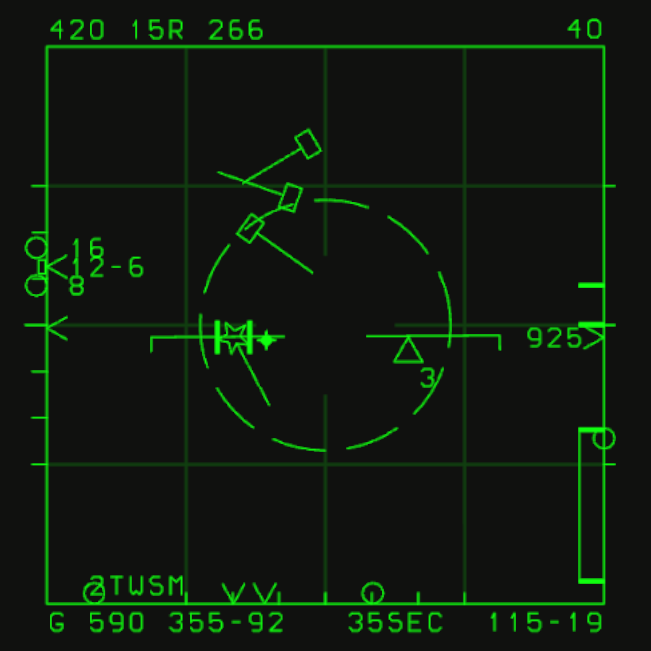
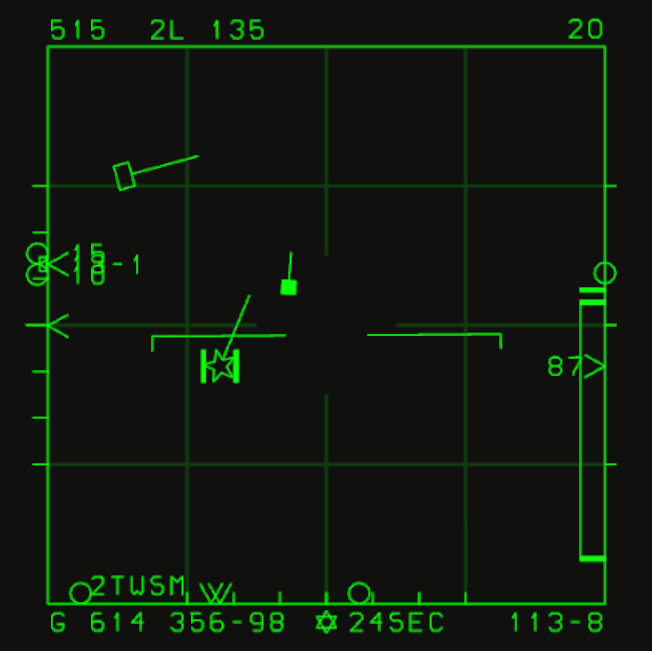
Figure 3: when the target enters missile range, the dashed ASE circle begins to expand, indicating that launch conditions are beginning to be met.
Figure 4: entering RTR produces a six-pointed star at bottom center and a flashing ASE circle, indicating favorable launch conditions. This screenshot captures the off phase of the flashing circle.
Post-launch missile support
After an AIM-120 launch in TWS, the radar maintains the target track and sends target updates to the missile by datalink. Continue monitoring tracking status, particularly before the missile activates its own radar and acquires the target.
Changing PDT does not automatically end support for the previous missile. You can select another PDT and launch again. When the previous PDT becomes an SDT, datalink updates continue as long as its track is maintained.
To support multiple missiles, keep their targets within radar scan coverage. Track loss caused by maneuvers, interference or leaving the scan area prevents fresh target updates. Entering STT discards other track files, so consider the effect on other missiles before changing modes.
AIM-120 actively acquires the target after activating its own radar. If the target is already inside activation range at launch, activation and active acquisition begin immediately.
Click an image to view its original resolution; click a number below it to jump to the explanation.
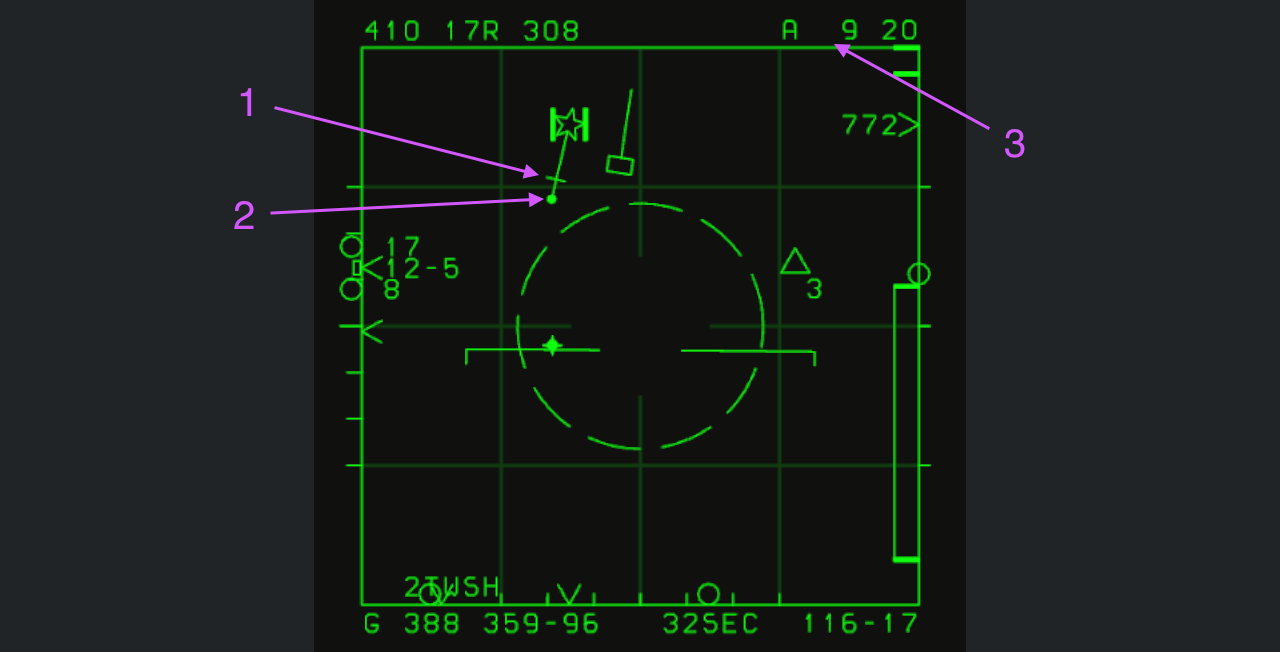
1. Activation progress marker
The short tick on the line moves toward the dot in item 2 after launch. Reaching the dot indicates that, according to the launch-condition calculation, the missile should have activated its own radar and begun searching actively.
2. Launched-missile marker
The dot indicates that one AIM-120 has been fired at this target and is receiving datalink support. It is also the reference point reached by the item 1 marker at estimated activation.
3. Time remaining to activation
Upper-right A 9 indicates an estimated 9 seconds until the missile activates its radar and begins active search. The countdown and item 1 together indicate activation progress.
Display after missile activation
After activation, the upper-right A countdown changes to T, the estimated time remaining until missile–target intercept. T 17 predicts intercept and impact in 17 seconds.
Click an image to view its original resolution; click a number below it to jump to the explanation.
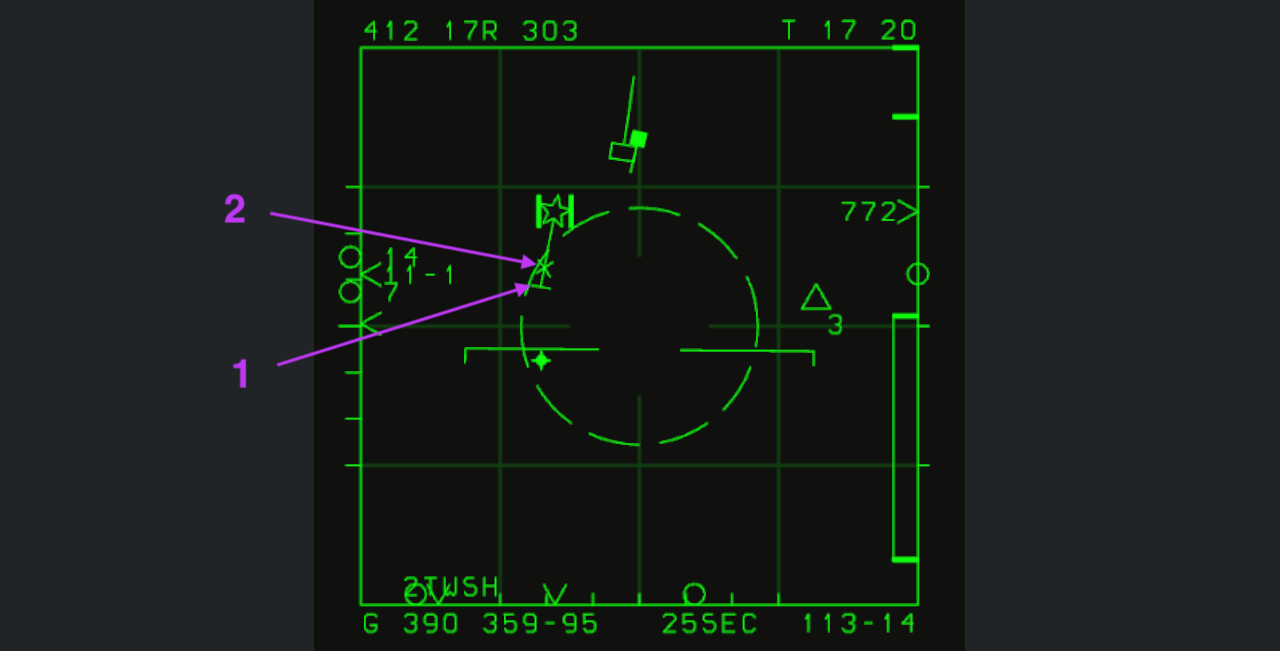
1. Missile-active marker
Item 1 indicates that the missile fired at this target has activated its own radar and begun active search.
2. Missile flight-progress marker
The X moves toward the target's five-pointed star, representing the missile flying toward it. It reaches the star at the precomputed intercept time.
These time and progress cues are calculated from conditions at launch. Target maneuvers or countermeasures generally make actual flight time longer than predicted. Countdown expiry or the X reaching the star marks the predicted intercept time, not a confirmed hit.
Close-range auto acquisition and Flood
Auto-acquisition scans and Flood illumination are referenced to the aircraft longitudinal axis and follow aircraft attitude. LRS and TWS instead reference the gimbal-stabilized horizontal plane.
Auto acquisition is primarily for WVR (within-visual-range combat). Long-range boresight can lock targets within 40 nautical miles; all other auto-acquisition modes operate within 10 nautical miles.
Mode selection
Move AA (Auto Acquisition) upward to enter these modes in sequence:
- First input: SS (Supersearch).
- Second input: VS (Vertical Scan).
- Third input: Boresight.
- Fourth input: Long-range boresight.
Hold AA upward to enter Flood.
SS — Supersearch
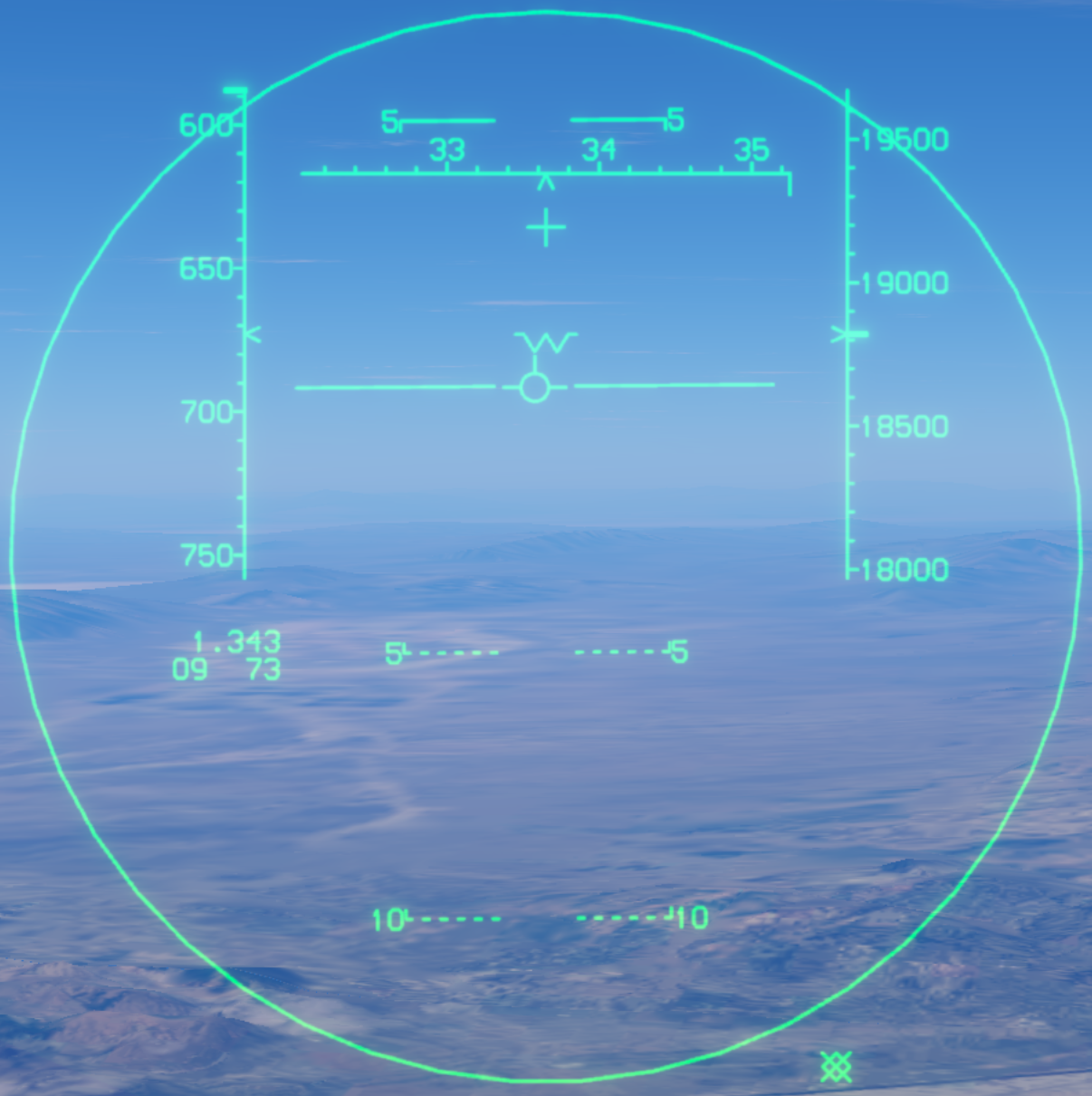
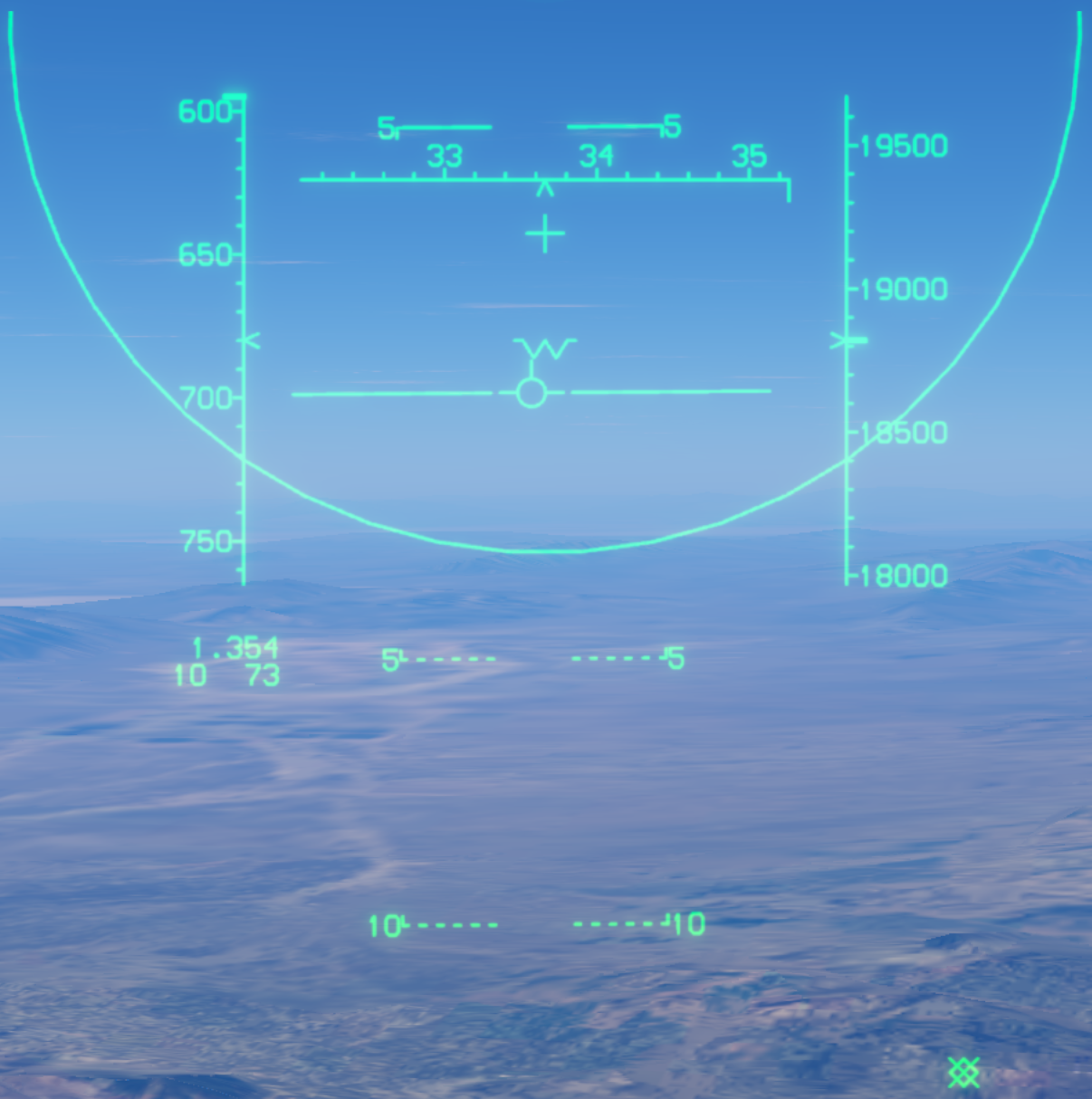
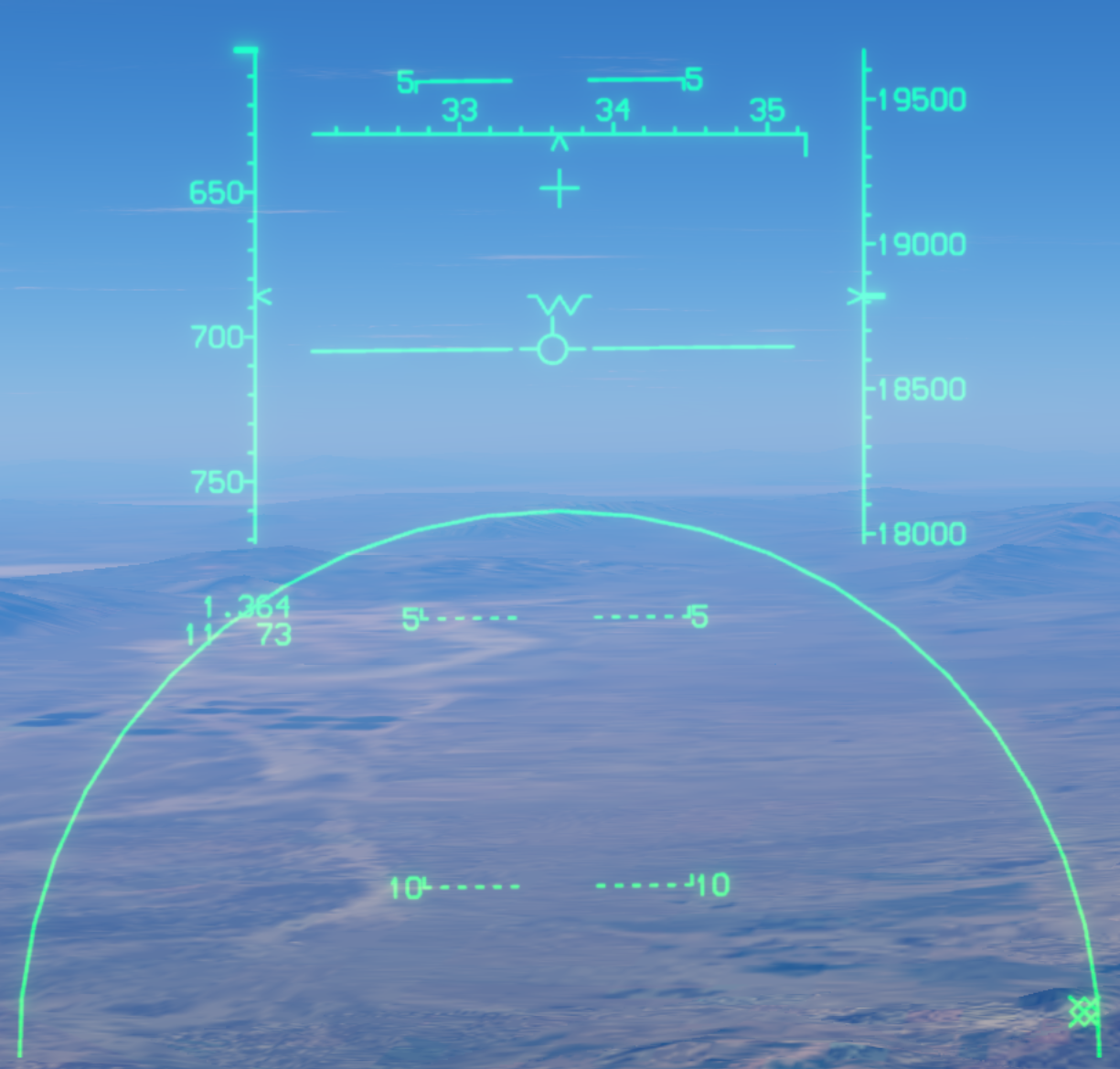
The first upward AA input enters SS. The large HUD circle represents 20° search coverage. Keep a target inside it for automatic acquisition within 10 nautical miles.
Antenna elevation control can shift the search area up or down by up to 10°. The images show centered, raised and lowered search circles; part of the displaced circle may extend beyond the HUD.
Vertical scan
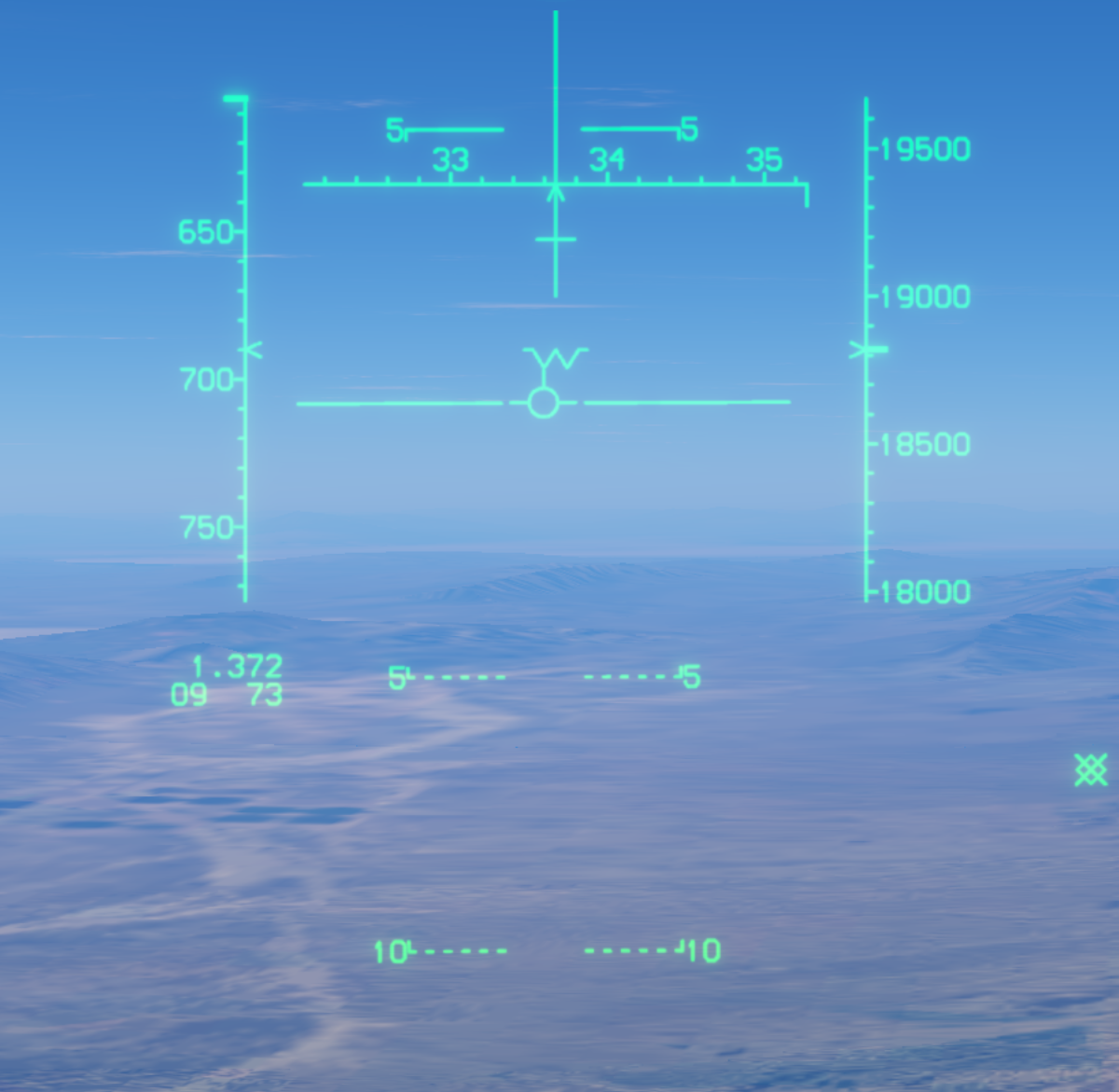
Vertical scan searches a tall, narrow area above the nose, useful after the merge when a target passes above the nose.
Boresight
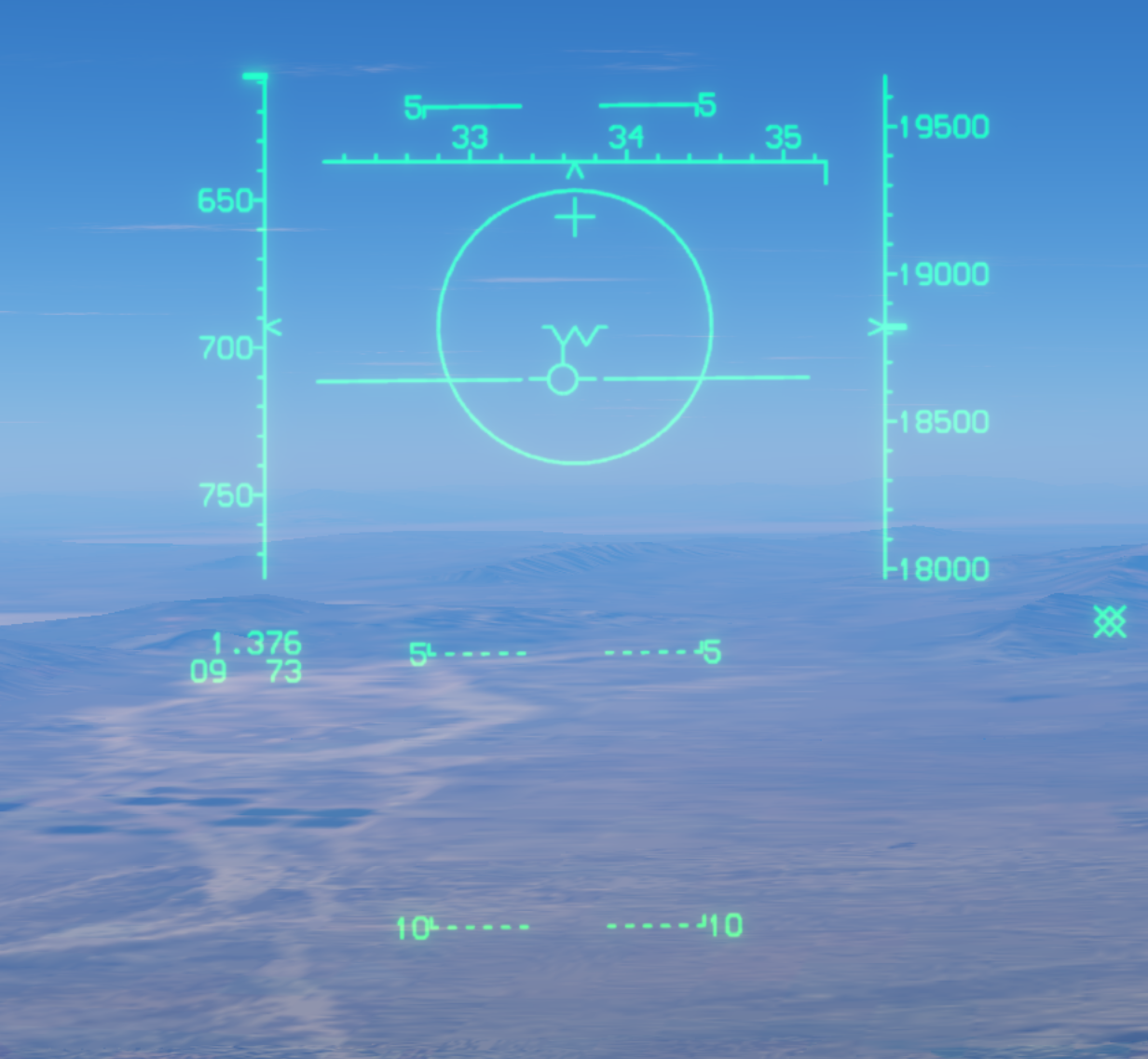
Boresight searches a narrow cone ahead and locks the first target that enters it.
Long-range boresight
LR BST works like boresight, but with a smaller HUD search circle and an automatic lock range of 40 nautical miles. Keep the target inside the small circle for acquisition.
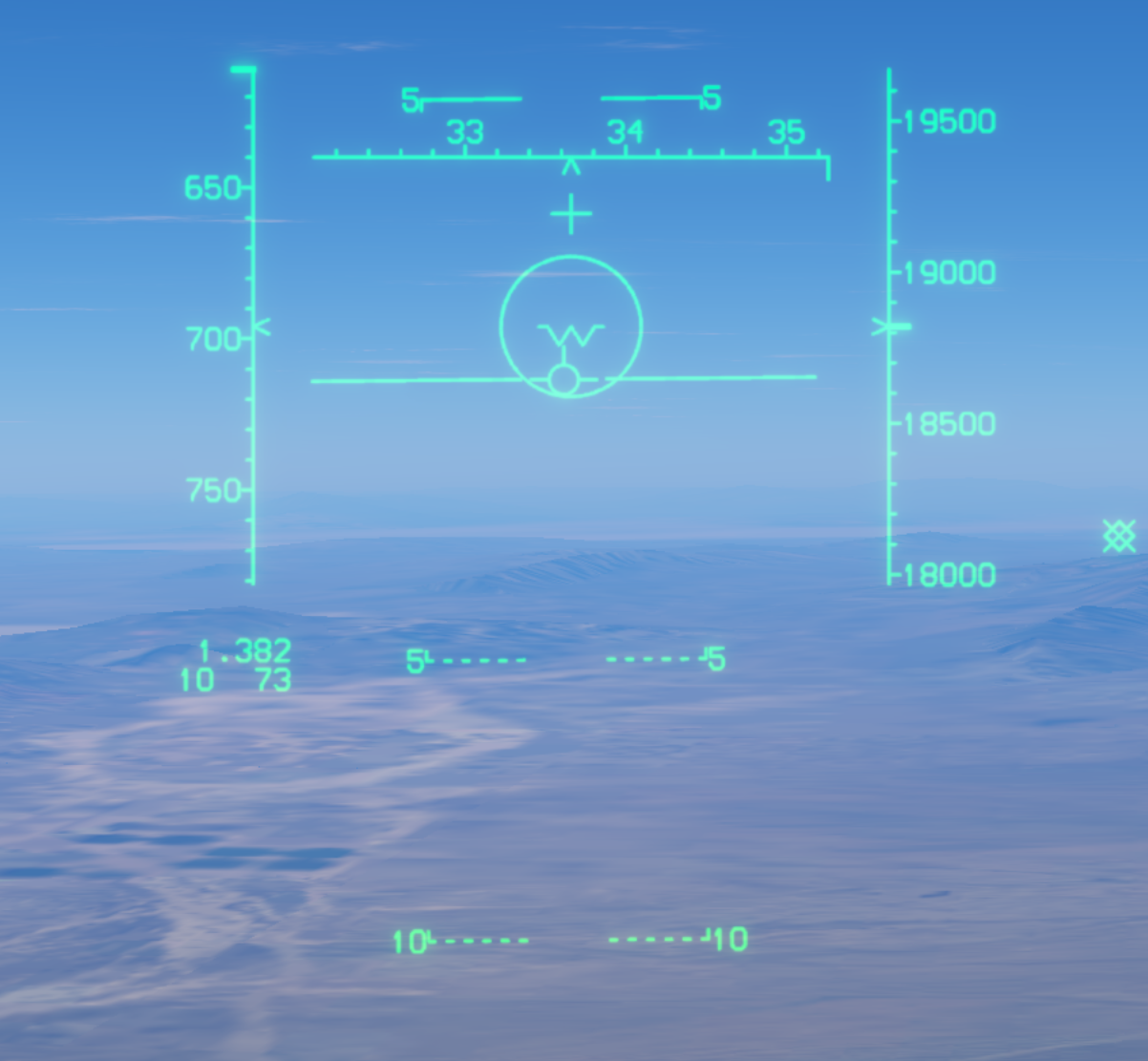
Flood
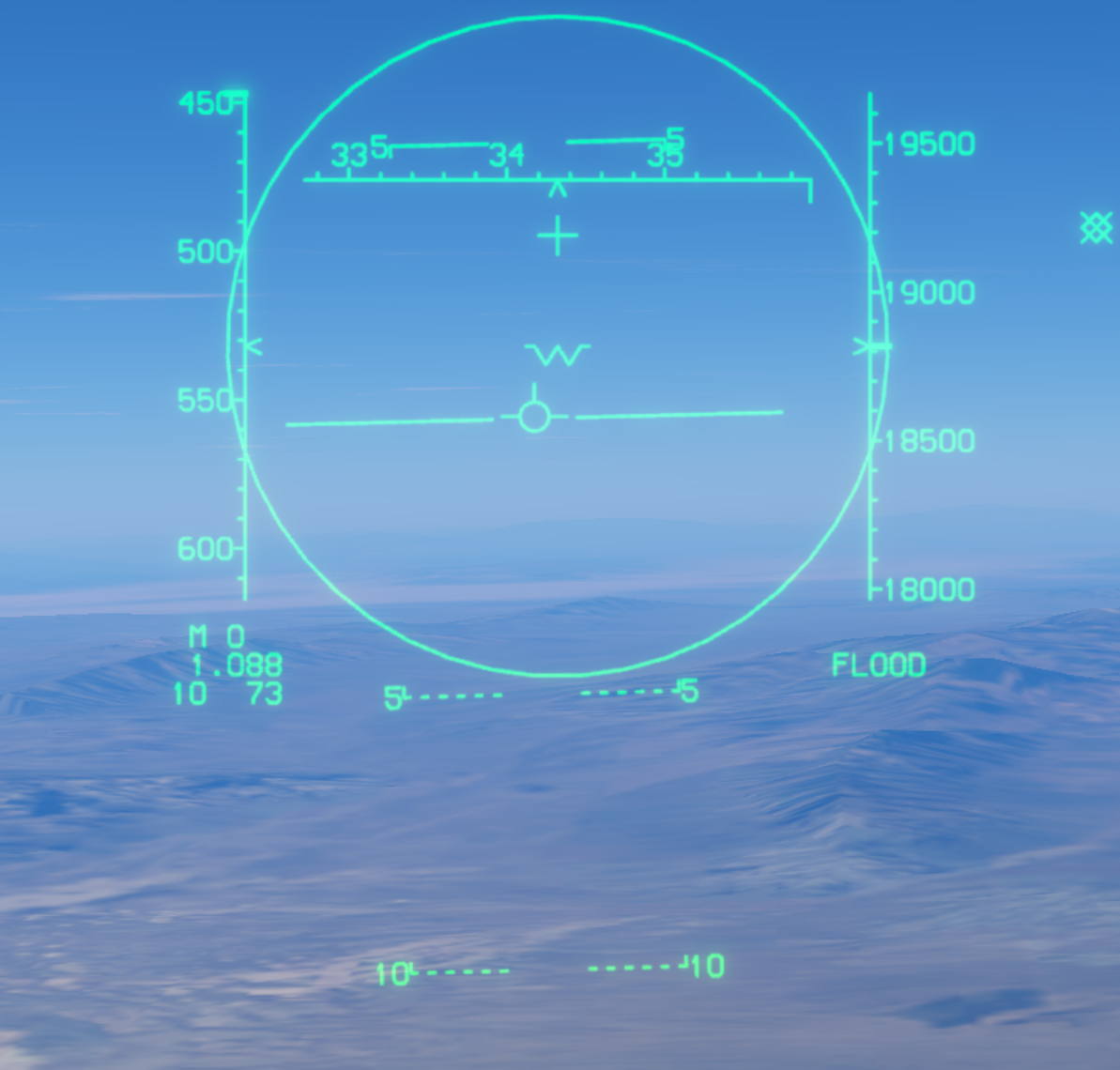
Flood provides wide-beam illumination for AIM-7. Keep the target inside the illumination circle until missile impact.
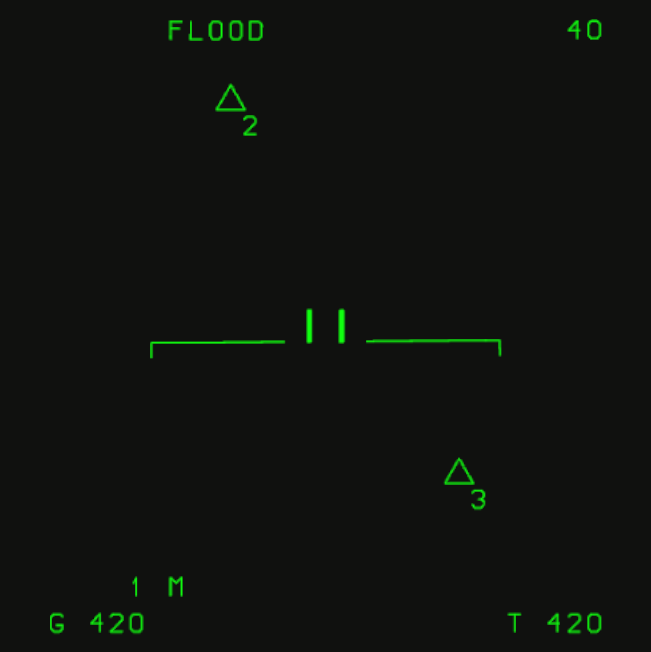
In Flood, the VSD changes as shown: FLOOD appears at the upper left and the range grid disappears. The local horizon reference, acquisition gate and navigation points remain visible.
Practical workflow
- Establish the distant air picture with LRS.
- Adjust antenna elevation for target altitude.
- Use TWS to prioritize multiple targets.
- Use STT when focused tracking or stable illumination is needed.
- Use auto acquisition after the merge.